
Summary
The article explains what WooCommerce is. It defines WooCommerce as a free WordPress plugin that lets you build and run an online store.
It also highlights key features, extensions, and how it works with WordPress. Helping readers understand WooCommerce’s role and benefits for ecommerce websites.
Looking to build an eCommerce store and thinking about what is WooCommerce?
The eCommerce website allows you to buy or sell physical goods, services, and digital products online.
In this modern era, many of us want to start an eCommerce store like Amazon, Flipkart, or Alibaba or a small-scale online store like Studio Neat.
WooCommerce is the best eCommerce platform that lets you build a unique eCommerce store for free.
Let’s dive into the topic and explore more about WooCommerce.
- What is WooCommerce?
- How Does WooCommerce Work?
- What to Look for in an eCommerce Platform
- What are the Key Features of WooCommerce?
- Pros and Cons of the WooCommerce Platform
- WooCommerce vs Other eCommerce Platforms: Key Differences
- How to Set Up WooCommerce?
- Why Choose WooCommerce Over Other eCommerce Platforms?
- FAQs
- Conclusion
What is WooCommerce?
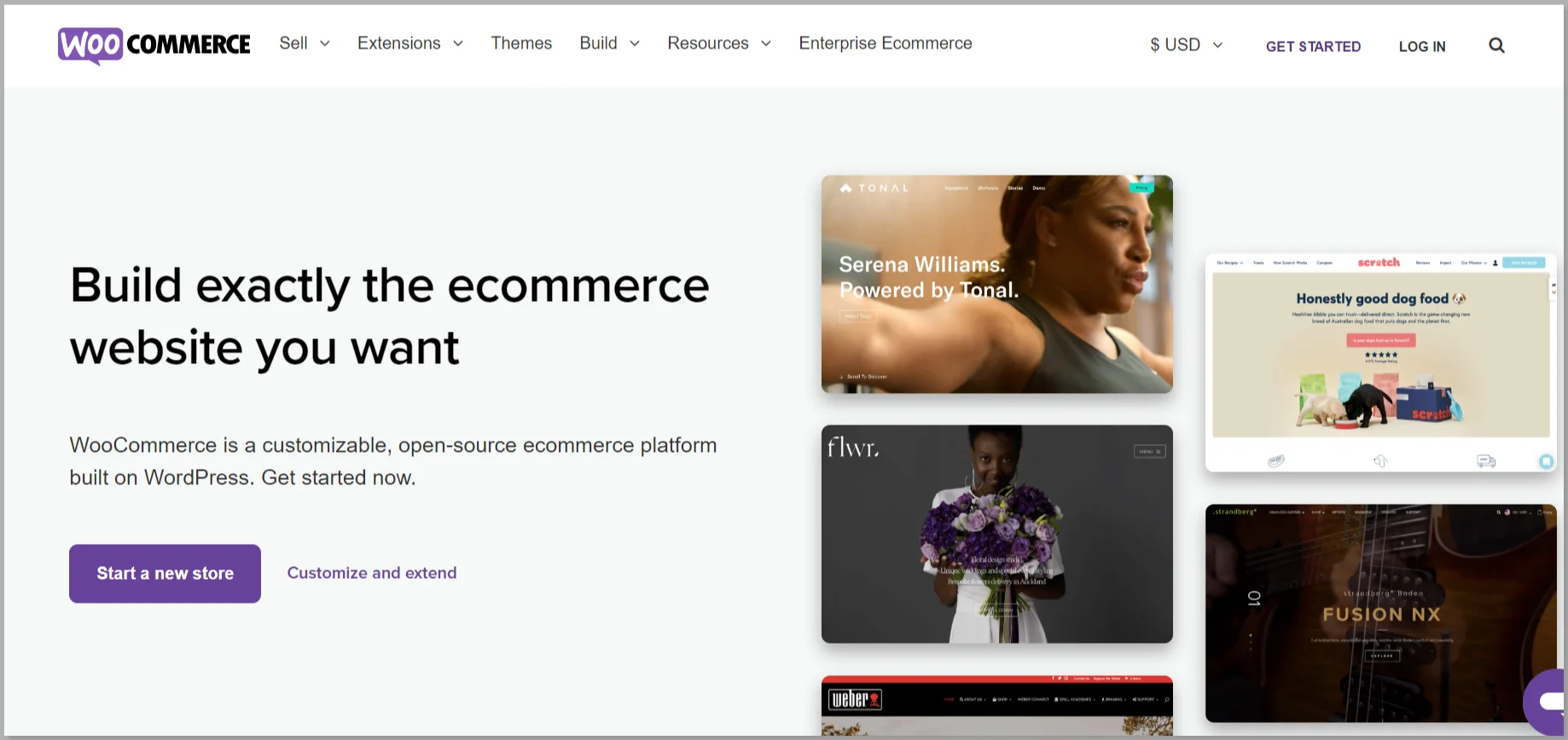
WooCommerce is an open-source eCommerce plugin associated with WordPress that helps you to build an online store and sell products or services from your website.
This means that it extends the capabilities of the WordPress platform by providing the necessary tools for online selling.
It’s the most popular eCommerce plugin that powers millions of WordPress store websites worldwide.
How Does WooCommerce Work?
Imagine you want to sell perfumes online. With WooCommerce, you can add pictures of the perfumes, write descriptions about them, and set a price.
Once you add the perfumes to the website, people will be able to view what you’re selling.
When someone wants to buy perfume, they can add it to their virtual shopping cart, just like when you go to a real store and put things in your cart.
Users can checkout and make online payments for the products using PayPal, Credit Card, or other payment methods. Once the payment is received, you can ship the perfume (or any products) to their provided address.
And that’s how WooCommerce makes it easy for people to buy and sell things online. Plus, it’s trusted by 6M+ WordPress users all over the world.
What to Look for in an eCommerce Platform
The following are a few aspects that you should keep an eye on when you are looking for an eCommerce platform for your store.
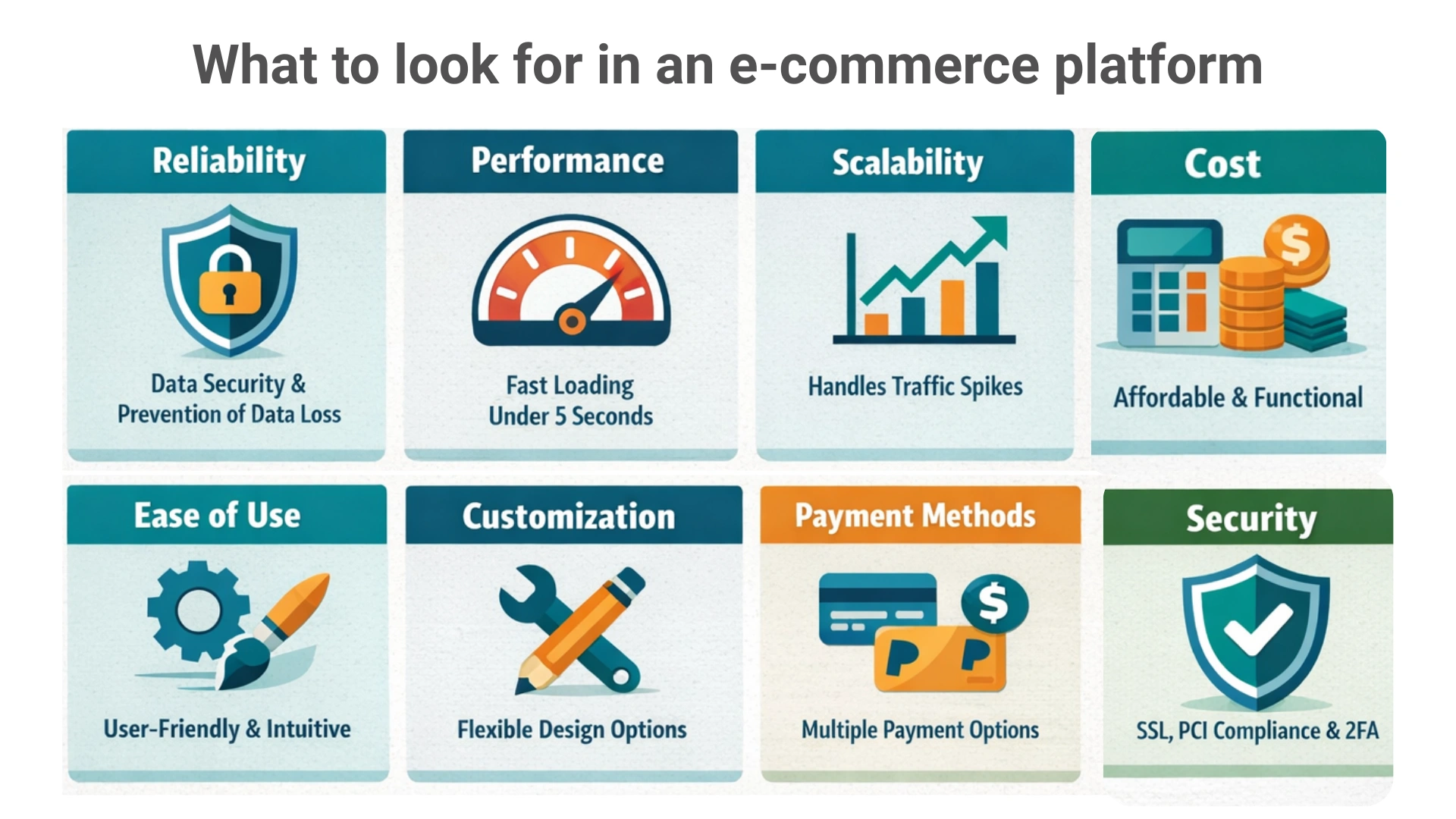
- Reliability: Choose a platform that ensures data security and prevents data loss, especially in cases like missed subscriptions on managed platforms.
- Performance: Fast loading time is critical. Stores should load within 5 seconds to meet performance expectations and search engine requirements.
- Scalability: Traffic fluctuates. The platform should handle sudden traffic spikes without affecting store performance.
- Ease of Use: Features should be well-documented, themes appealing, and tools easy to use to help increase traffic and conversions.
- Customization: The platform should allow easy customization to adapt to changing customer preferences and business needs.
- Payment Methods: The platform should support multiple, reliable payment integrations to make purchasing easy for customers.
- Cost: Select a platform that offers the required features within your budget, balancing functionality and affordability.
- Security: Ensure strong security measures, regular updates, SSL certification, PCI DSS compliance, and two-factor authentication.
What are the Key Features of WooCommerce?
An eCommerce store must have various features that help to sell the products online.
WooCommerce is a plugin that boasts tons of features to help you set up an amazing eCommerce store.
Here are the top features of the WooCommerce plugin
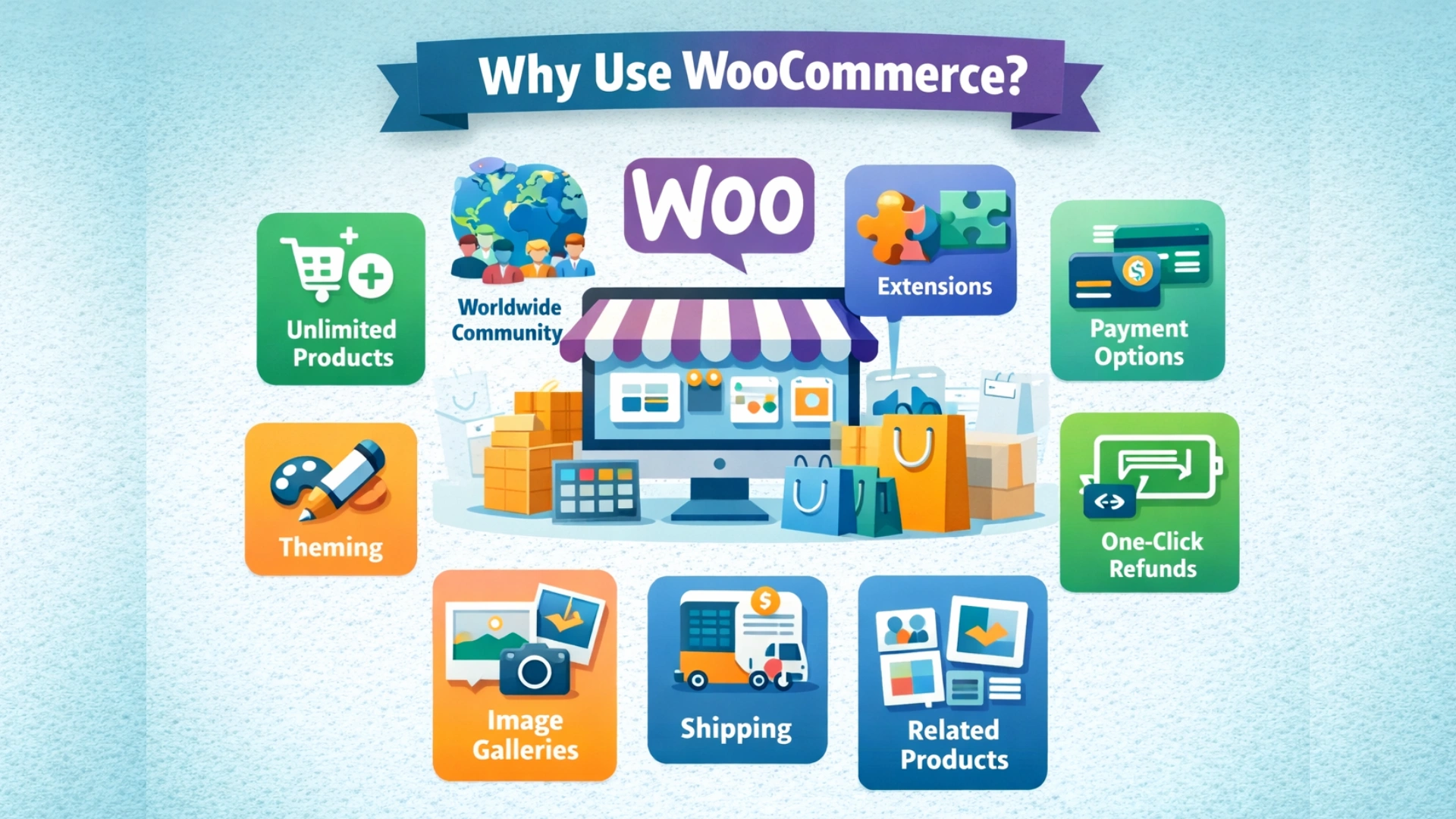
1. Unlimited Product Listing
WooCommerce is an entirely open-source platform. So you can modify and customize your store to make it look and feel just the way you want it to.
Because you have full control, you can add as many products and users as you want and take as many orders as you want.
2. Worldwide Community
From Sweden to Australia, India to the USA, WooCommerce stores and developers come from all over the world.
3. High Number of Extensions
Over 400 WooCommerce official extensions and numerous plugins are available, ranging from marketing to accounting, payment to shipping.
4. Compatible with Most Themes
WooCommerce is designed to work seamlessly with thousands of themes, including WordPress’s own default themes and other popular themes like Responsive.
5. Blogging
WooCommerce gives you the capability to publish great content and build a strong brand with its in-built blogging feature.
6. WooCommerce is Organized
With the WooCommerce categories and tags, your customers can easily locate what they’re looking for. You can provide attributes like color and size to help your customers find the products that are most appropriate for their needs.
7. Unlimited Images and Galleries
With the WooCommerce plugin, you can include several images in your online store to help customers view your product from all angles. Additionally, you can also set featured images to highlight the best picture of your featured products throughout your online store.
8. Built-In Payment Processing
The plugin works with payment gateways like Stripe, PayPal, GPay, etc. It allows you to accept credit/debit cards or other online transactions. You can also enable options like Cash on delivery and payments through direct bank transfers or checks.
9. Shipping Options
With WooCommerce, you can provide a variety of options to your customers, like picking up their order from a location, having it delivered to their address, or shipping it to other locations.
WooCommerce lets you set product-specific as well as location-specific shipping rates, such as additional charges for heavy items and far-off places.
You can also offer free shipping on your online store for certain products or in certain places. It’s up to you totally.
10. One-Click Refunds
WooCommerce works well with refunding products. It helps you provide refunds to your customers just with a single click from your WordPress dashboard.
11. Related Products
Showing relevant products is one of the best methods of cross-selling.
In your WooCommerce store, you can display related products on product pages and even on cart pages.
Pros and Cons of the WooCommerce Platform
Until now, we’ve understood the working of the WooCommerce along with its features. Now let’s see if there is any downside to this plugin by objectively comparing the pros & cons:
| ✅ Pros | ❌ Cons |
| ???? Free to start and open source ???? Works seamlessly with WordPress ???? Full control over design and features ???? Large ecosystem of themes and plugins ???? Supports physical and digital products ???? Wide range of payment and shipping options ???? Scales well for small and medium businesses | ???? You must manage hosting yourself ???? Performance depends on hosting quality ???? Many advanced features are paid ???? Needs regular updates and maintenance ???? Not ideal for very large stores without tech help ???? Can feel complex for complete beginners |
WooCommerce vs Other eCommerce Platforms: Key Differences
To get a clearer picture, let’s compare WooCommerce with three other popular eCommerce platforms:
| Feature | WooCommerce | Magento | Shopify | BigCommerce |
| Performance | Depends on hosting and WordPress optimization | Depends heavily on hosting, server setup, and optimization | Fast and optimized by default | High performance with built-in optimization |
| Security | Secure with plugins and updates | Strong security patches but requires technical handling | Managed security included | Enterprise-grade managed security |
| Ease of Use | Easy for WordPress users | Complex and developer focused | Very beginner friendly | Easy but slightly more advanced than Shopify |
| Product Management | Simple and flexible product management | Advanced catalog and pricing features | Easy product setup with limits | Strong product and catalog management |
| Payment Options | Wide gateway support via plugins | Supports many gateways with extensions | Built-in payments and third-party gateways | Built-in and global payment options |
| Customization | Highly customizable with themes and plugins | Highly customizable but developer dependent | Limited customization without apps | More built-in customization than Shopify |
| Hosting Requirement | Self hosted | Self hosted | Fully hosted | Fully hosted |
| Scalability | Best for small to medium stores | Best for large and enterprise stores | Good for growing businesses | Excellent for fast scaling businesses |
How to Set Up WooCommerce?
Now that you’ve understood why WooCommerce is so popular, let’s move ahead and discuss in detail how to set up a WooCommerce store.
Step 1: Purchase Domain Name and Hosting
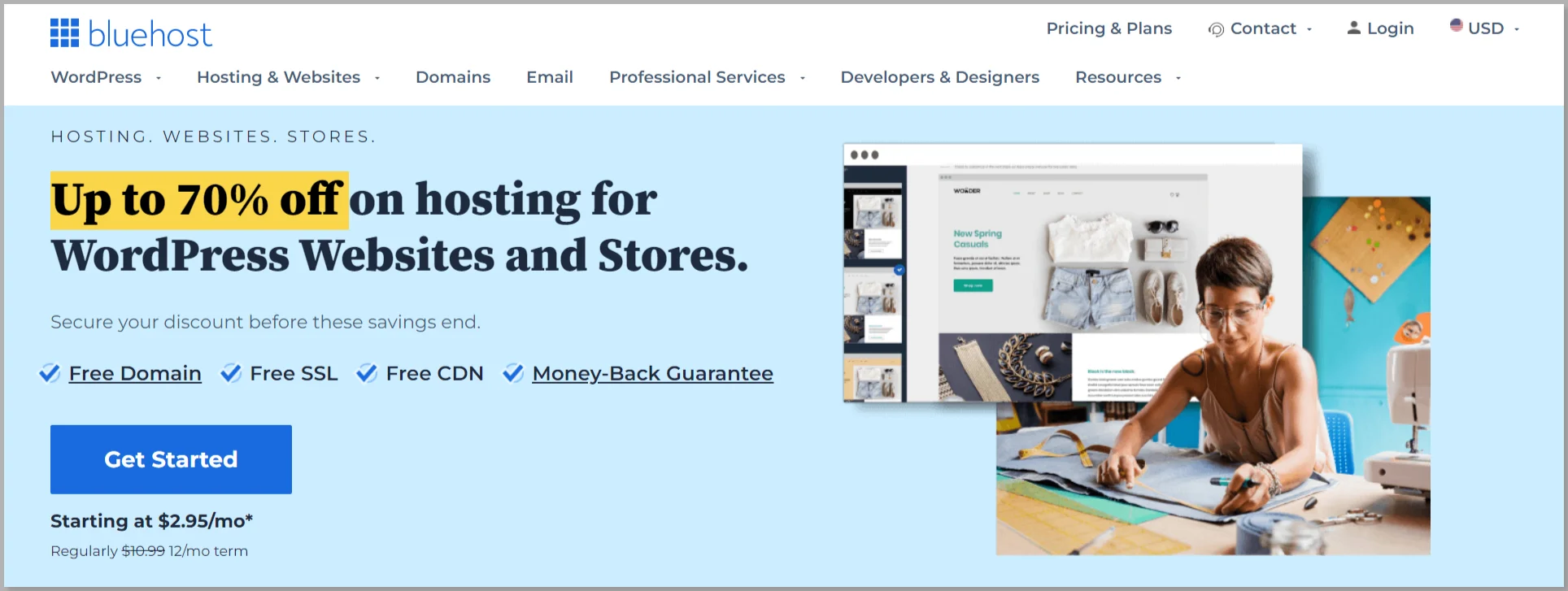
As WooCommerce works on WordPress, the first step you’ll need for your website is a domain name and hosting provider.
A domain name is the address or name of your website using which your customers can locate you. Whereas Web hosting is the service that helps you store and maintain all your website files on a server, thereby making your website accessible on the internet.
Some service providers sell both domain and hosting. They include Bluehost, GoDaddy, NameCheap, etc.
Do not buy a domain name from an unknown source! You can also buy hosting from a few best web hosting providers like Kinsta. Some of the services, like Bluehost, even offer you to register the domain name for free. We recommend you do the same.
Of the many hosting providers, we recommend you to use Bluehost as it is reliable, cost-effective, and provides great support.
Why Bluehost is a Top Notch Service Provider?
Here are several compelling reasons to consider Bluehost:
- Bluehost is renowned for its high website speed and performance, thanks to advanced technology like the Cloudflare CDN, which provides fast and stable website speeds.
- Bluehost places great emphasis on website security, providing features like SSL certificates, CodeGuard backups, and SiteLock security to keep your site safe from malware and cyber threats.
- Navigating the Bluehost interface is user-friendly and straightforward, making managing your website and hosting easy.
- Their expert support team is available 24/7 to assist with any issues that may arise, from plugin to server errors, and provide prompt solutions.
Bluehost offers flexible plans tailored to meet the needs of various customers, from small business owners to high-traffic enterprise sites.
Step 2: Install WordPress
After registering your domain name with a hosting provider, the next step is to install WordPress.
Most web hosting services like Bluehost provide a one-click WordPress installation option.
This is simple as compared to the conventional method of downloading and uploading WordPress to your web hosting account.
After installing, your WordPress site is ready for customization. You can log in to your WordPress site to go to the WordPress dashboard.
The WordPress dashboard is the area where you can manage your entire site’s features, looks, and functionalities.
Step 3: Install Responsive Theme

Now that you’ve logged into your WordPress dashboard, the next step is to select a theme for your online store. The theme you choose should be compatible with WooCommerce, visually appealing, easy to customize, and mobile-friendly.
We recommend using the Responsive theme as it is popular, versatile, and perfect for creating any WooCommerce store.
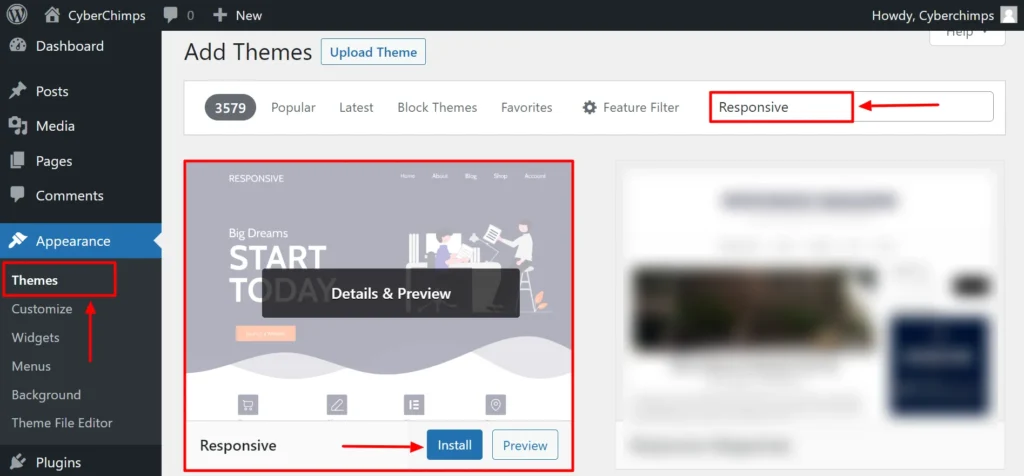
To install the Responsive theme, head over to your WordPress dashboard.
Navigate to Appearance menu > Themes
Click on the Add New button.
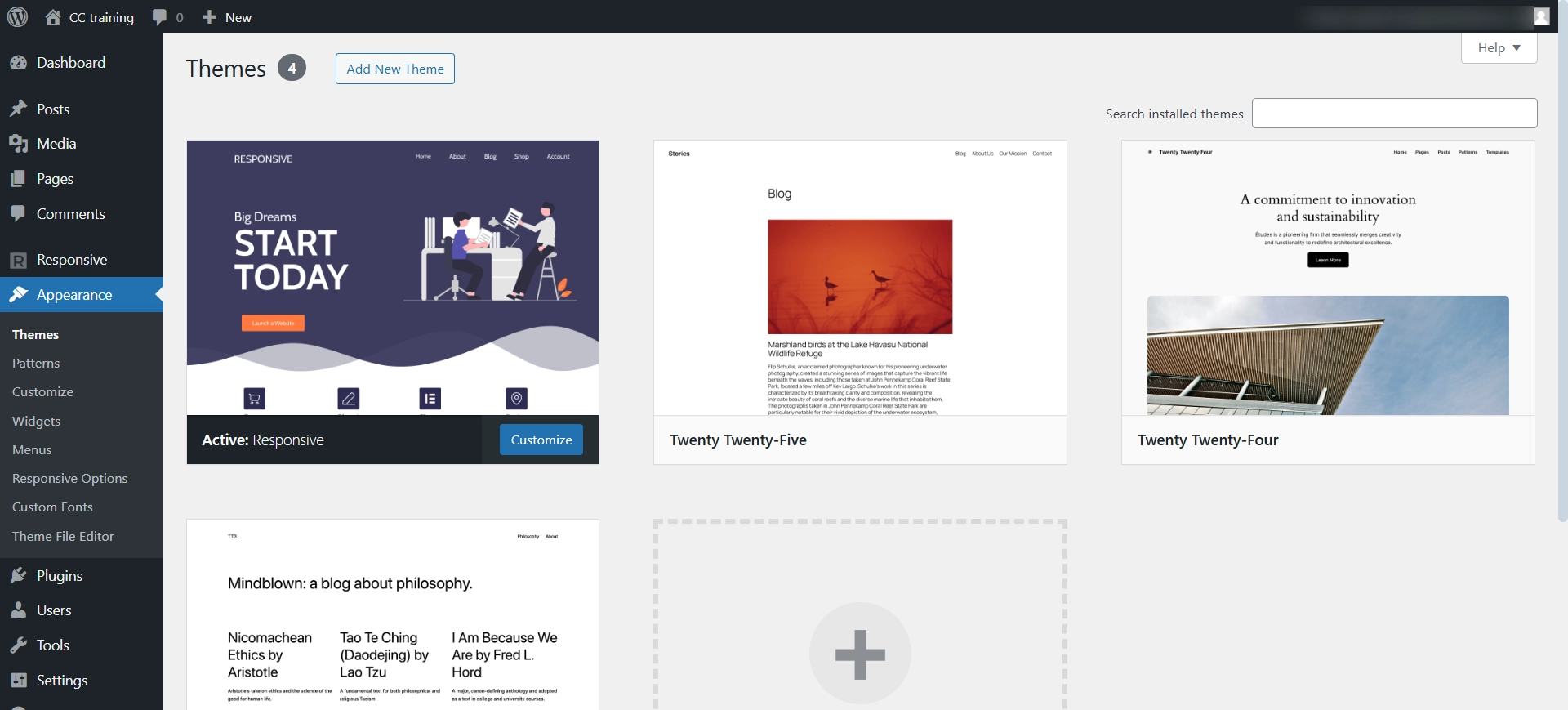
Search for Responsive and click on the Responsive theme.
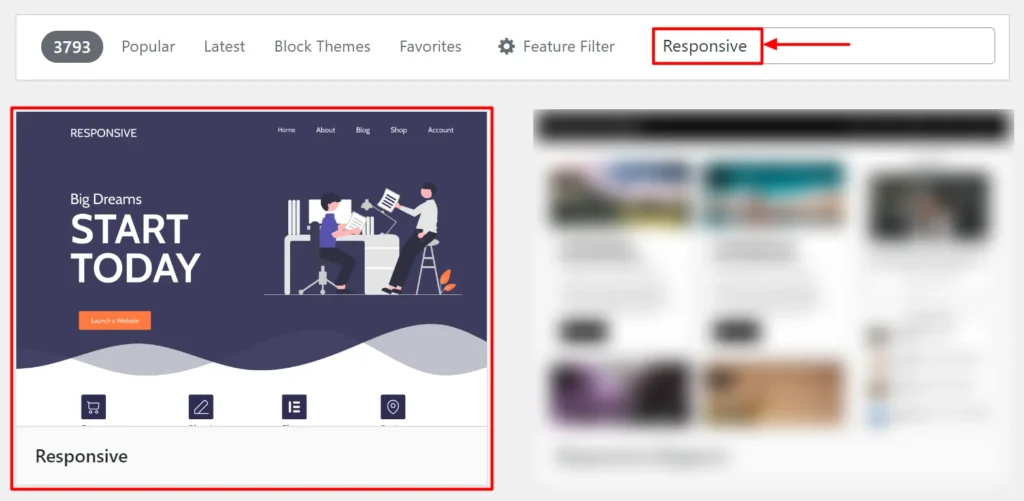
Click on the Install button. Then activate the Responsive theme by clicking on the Activate button.
You can customize your theme to give your store a desired look.
To customize, hover over Appearance and click on the Customize button.
You get a variety of Customizer options like Header, Footer, Sidebar, Site Identity, and so on.
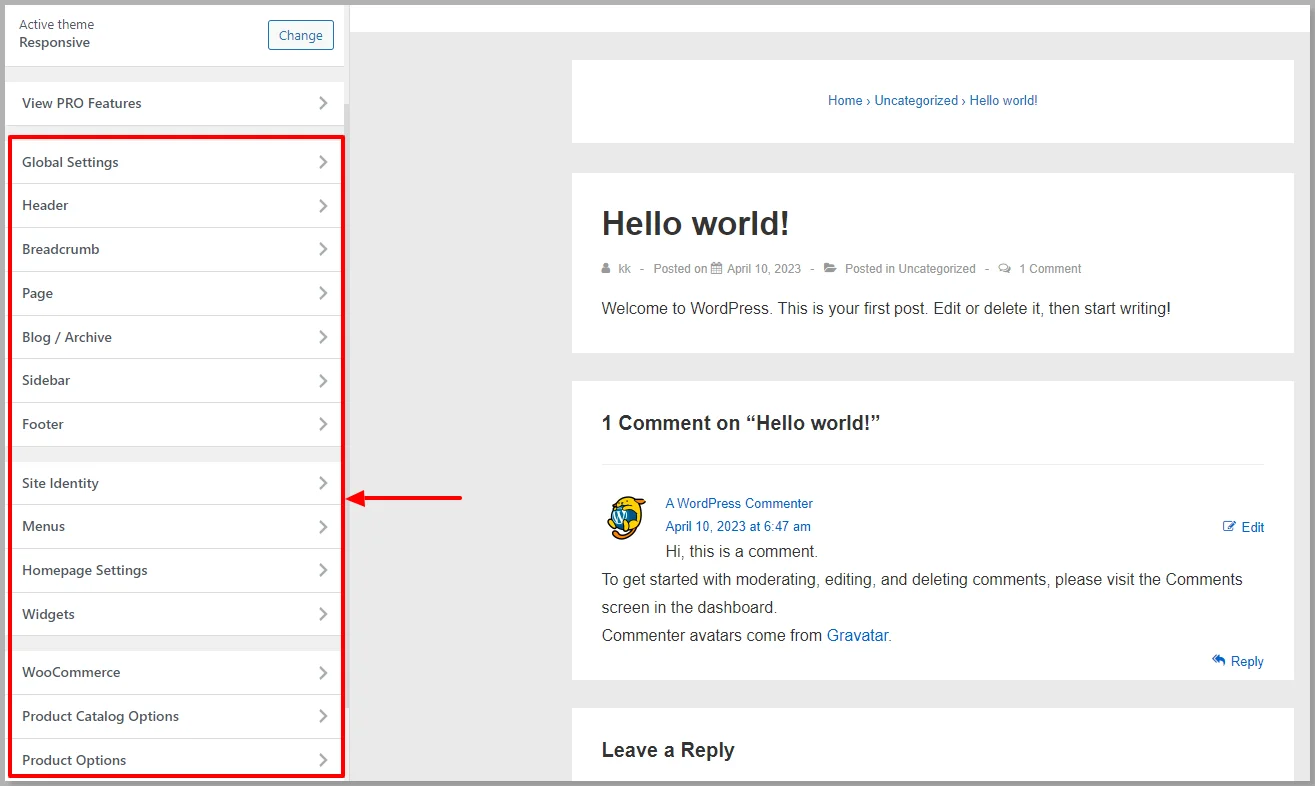
You can customize it according to your style, as the Responsive theme has a set of great customizer options.
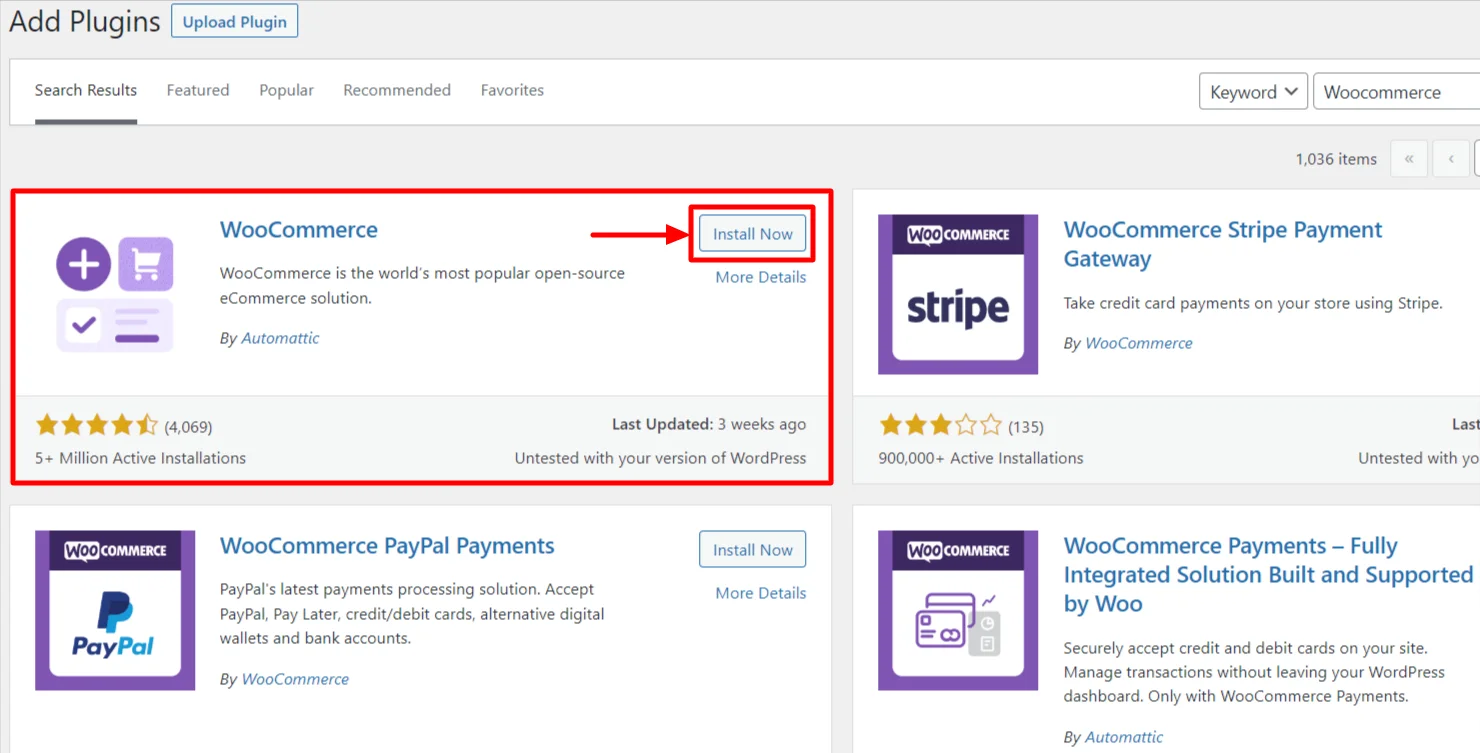
Step 4: Install WooCommerce Plugin
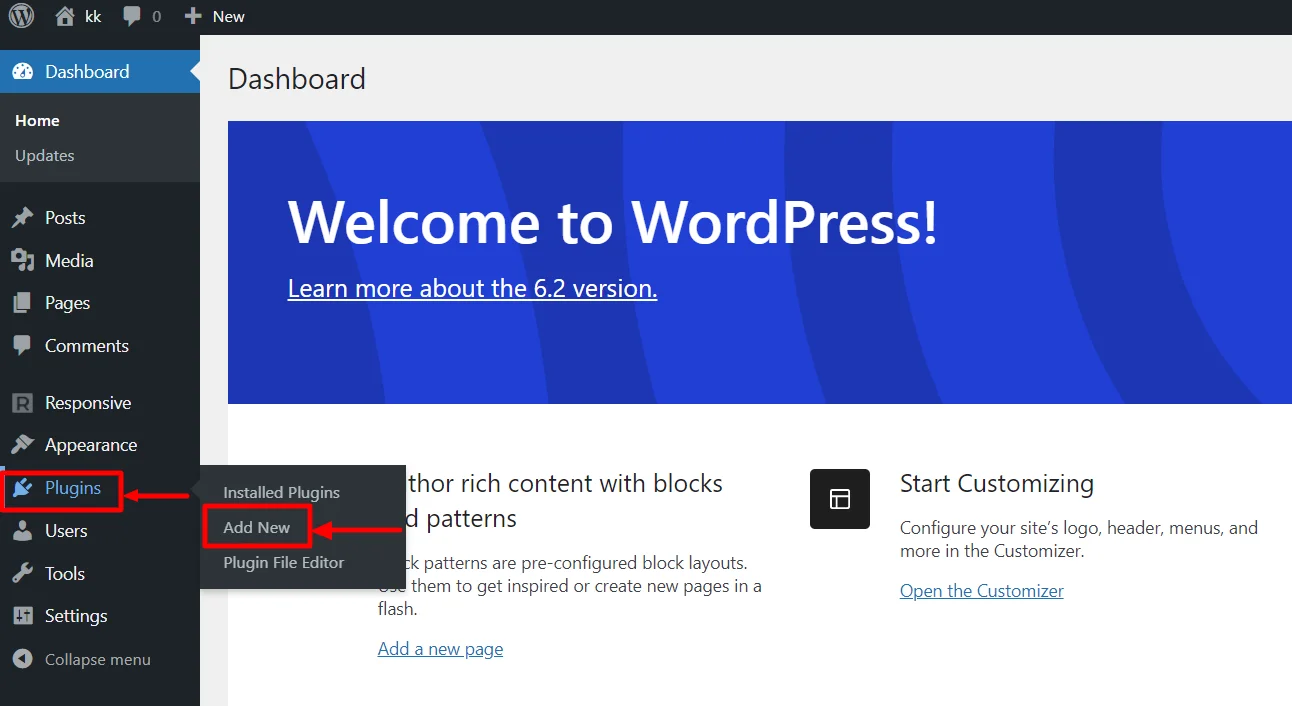
To install the WooCommerce plugin, head over to your dashboard.
Hover over Plugins and click on the Add New button.
Search for the plugin by typing WooCommerce.
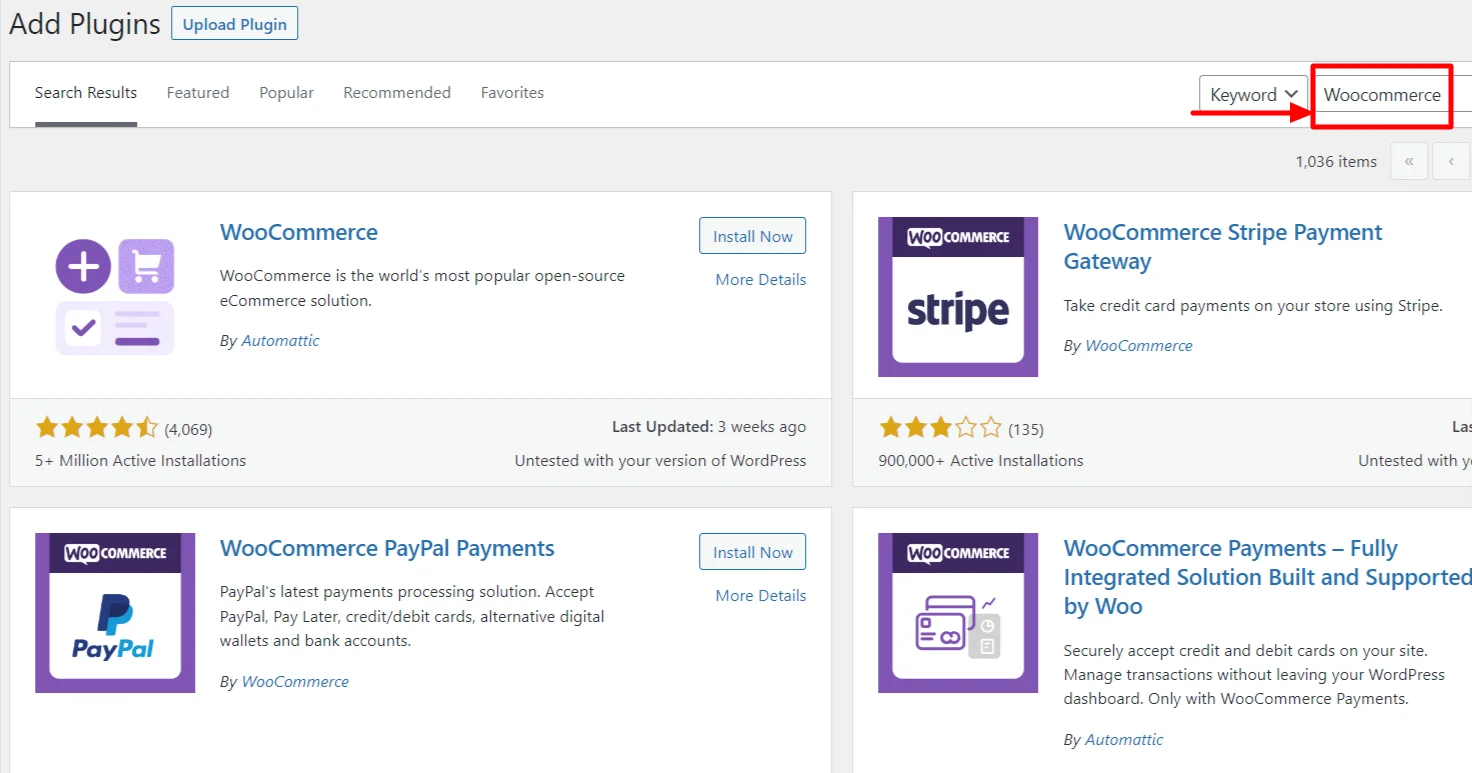
Install the plugin by clicking the Install Now button and then Activating it.
Step 5: Setting Up Your WooCommerce Store
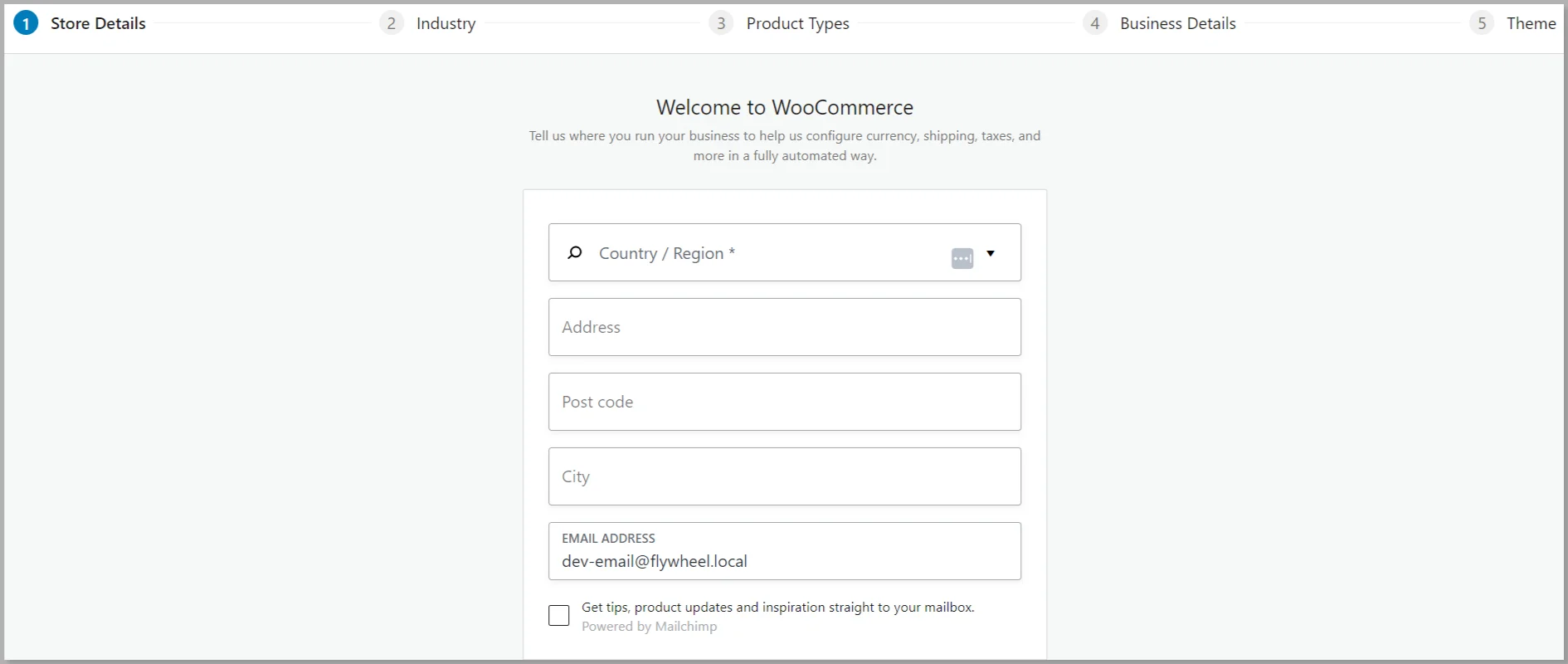
Once you’ve installed the WooCommerce plugin, a setup Wizard appears, and we recommend you go through the process.
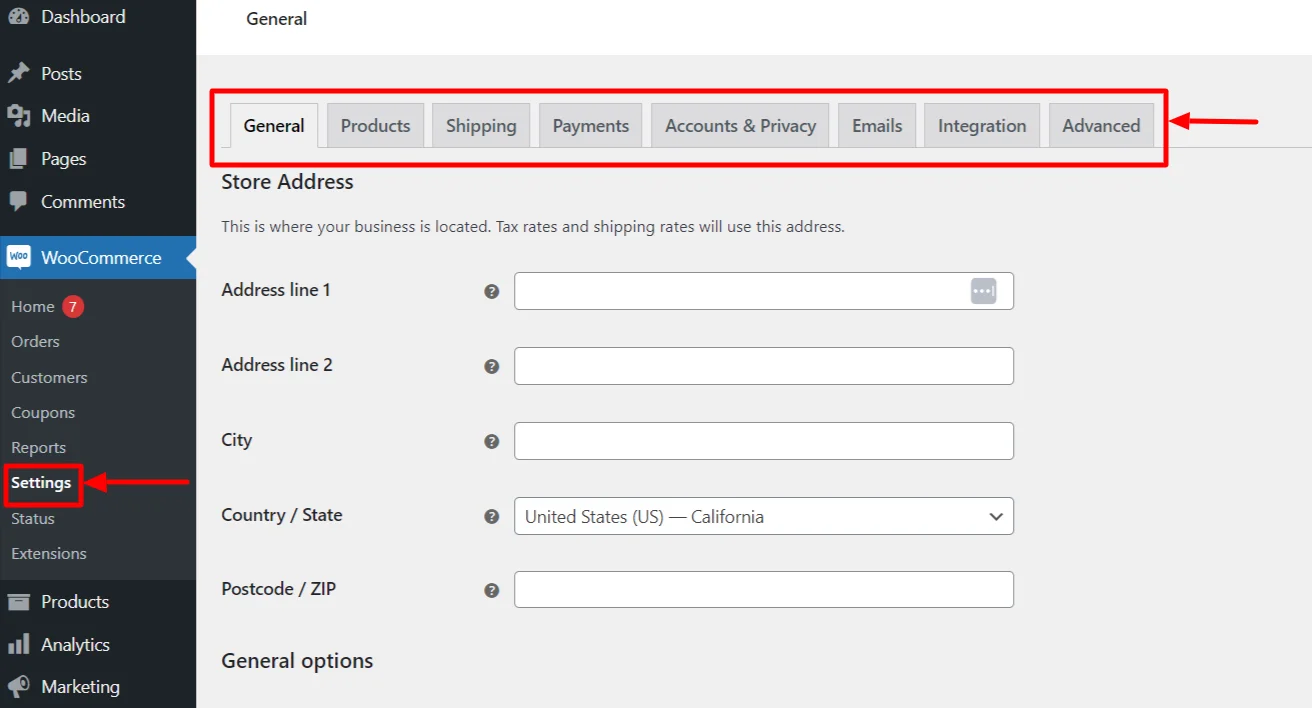
You can also manually set up the process by heading over to the dashboard and clicking on the Settings menu.
Step 6: Configure Basic WooCommerce Settings
In the settings menu, you can configure basic WooCommerce settings like General, Products, Shipping, etc.
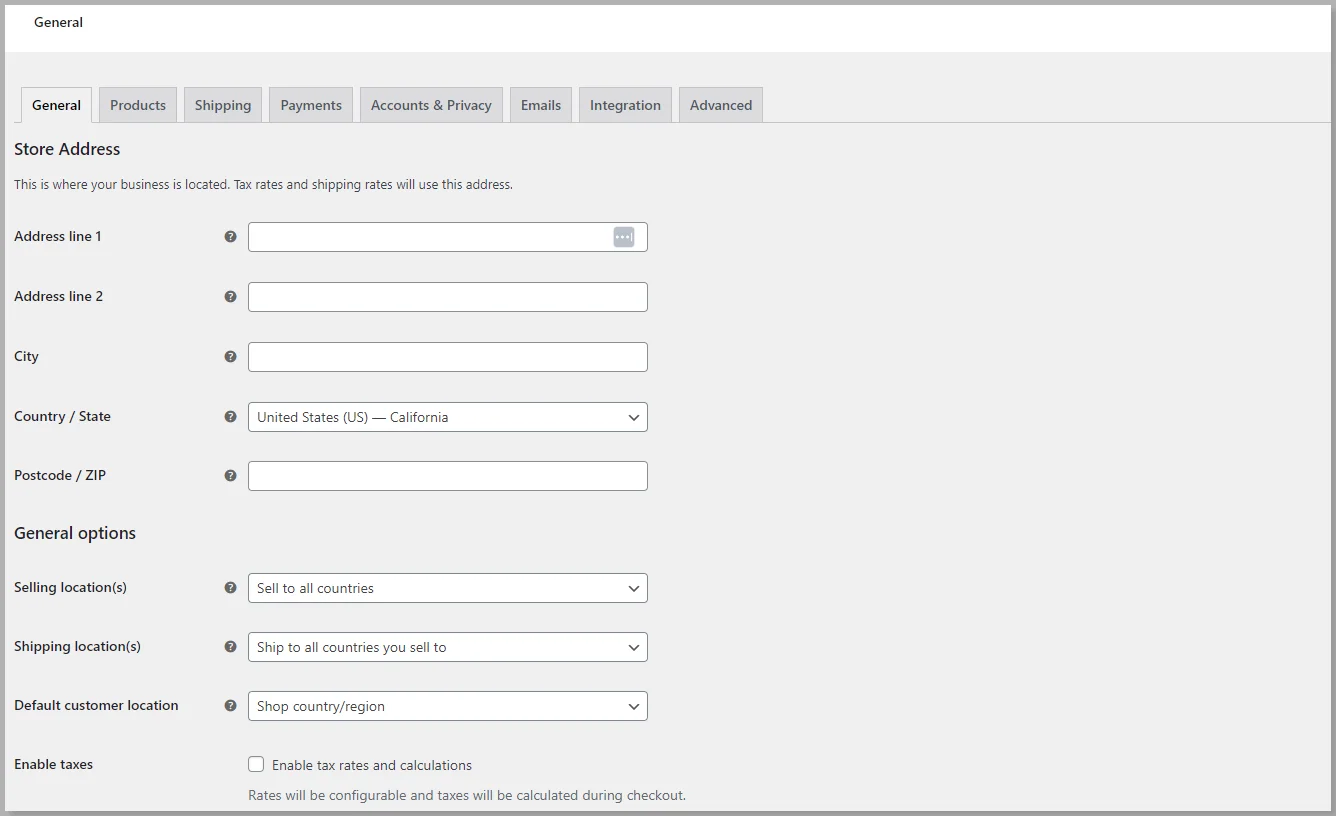
1. General Tab
In the General tab, you need to provide information about your Address, City, and ZIP code.
You can also enable taxes on the products for shipping to other countries.
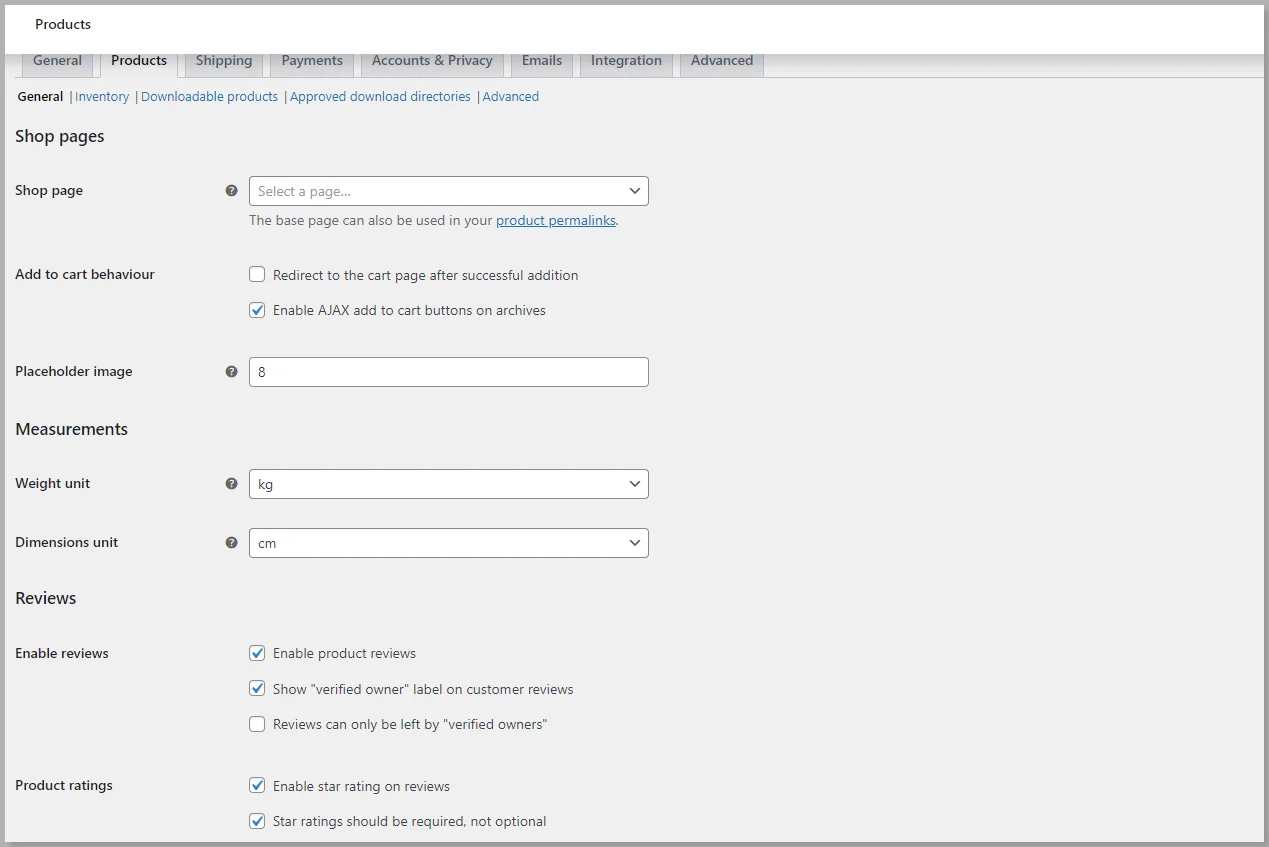
2. Products Tab
You can provide standard information about your products, like measurements, enabling product ratings, and reviews.
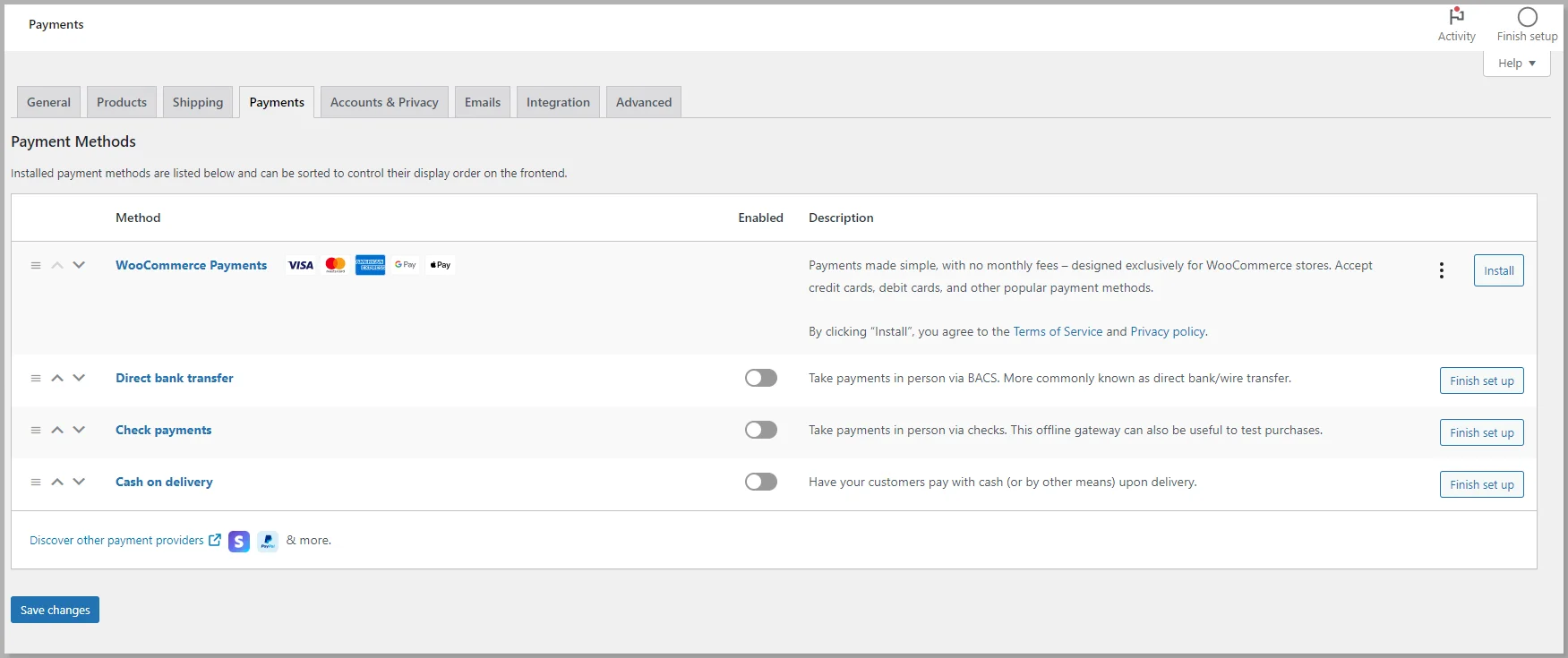
3. Payments Tab
In the payments tab, you can enable the various modes of payments your customers can use for purchasing the products.
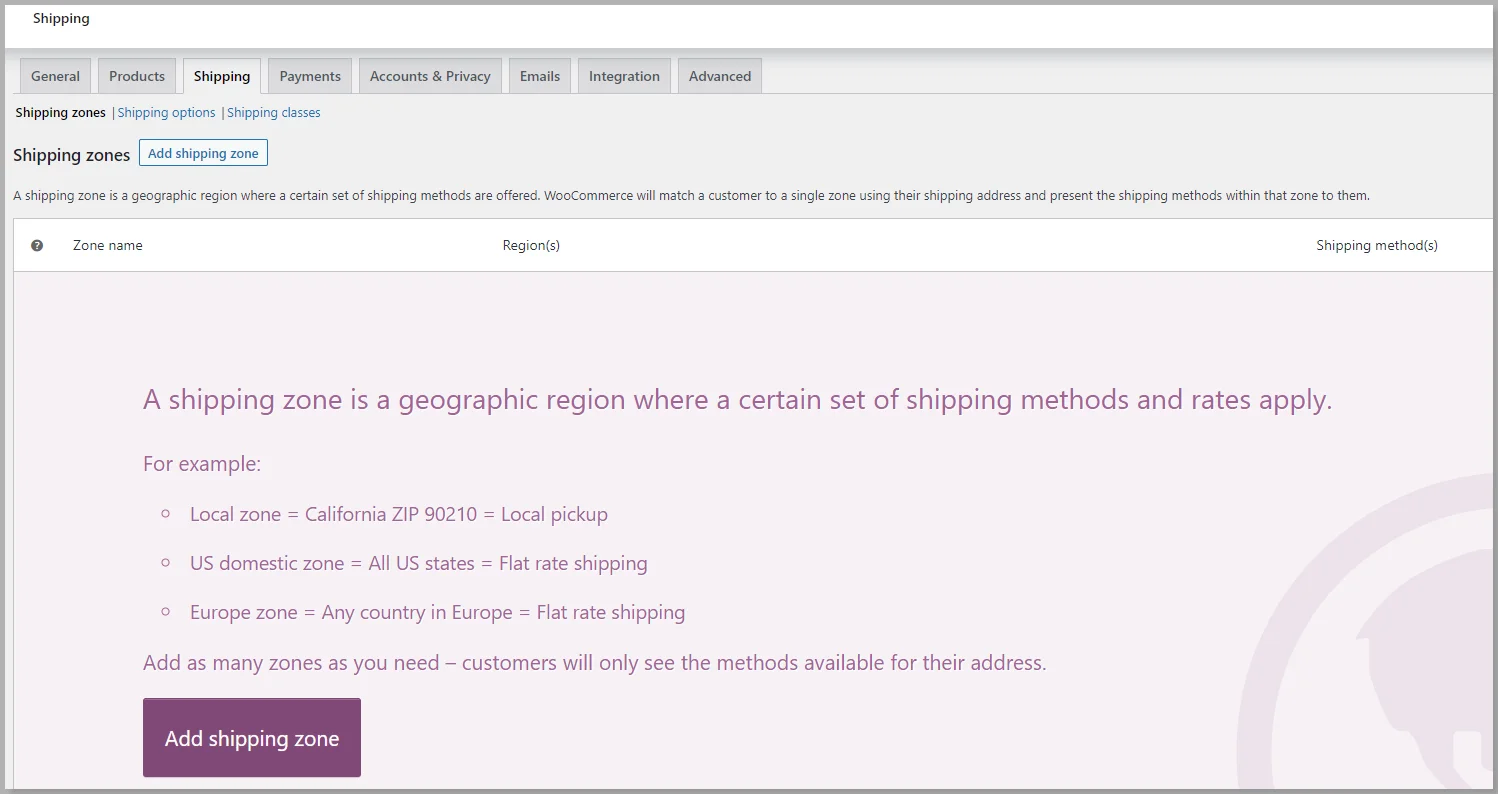
4. Shipping Tab
The shipping tab allows you to choose the shipping zone so you can deliver your products to that location. This helps to decide the product rates depending on the location.
Once you have completed all the basic WooCommerce settings, you’re good to go ahead and add products to your store.
Step 7: Add a Product
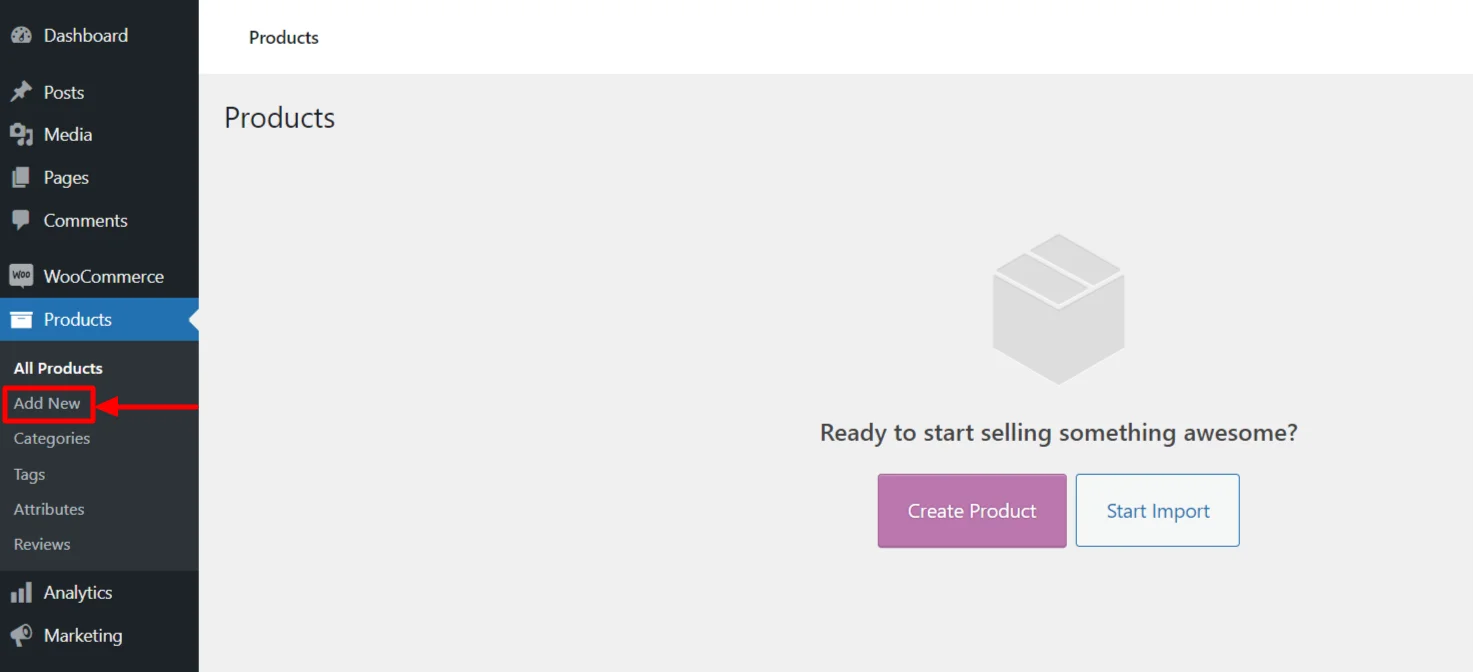
After the successful installation of WooCommerce, you’ll see the Products menu in the WordPress dashboard.
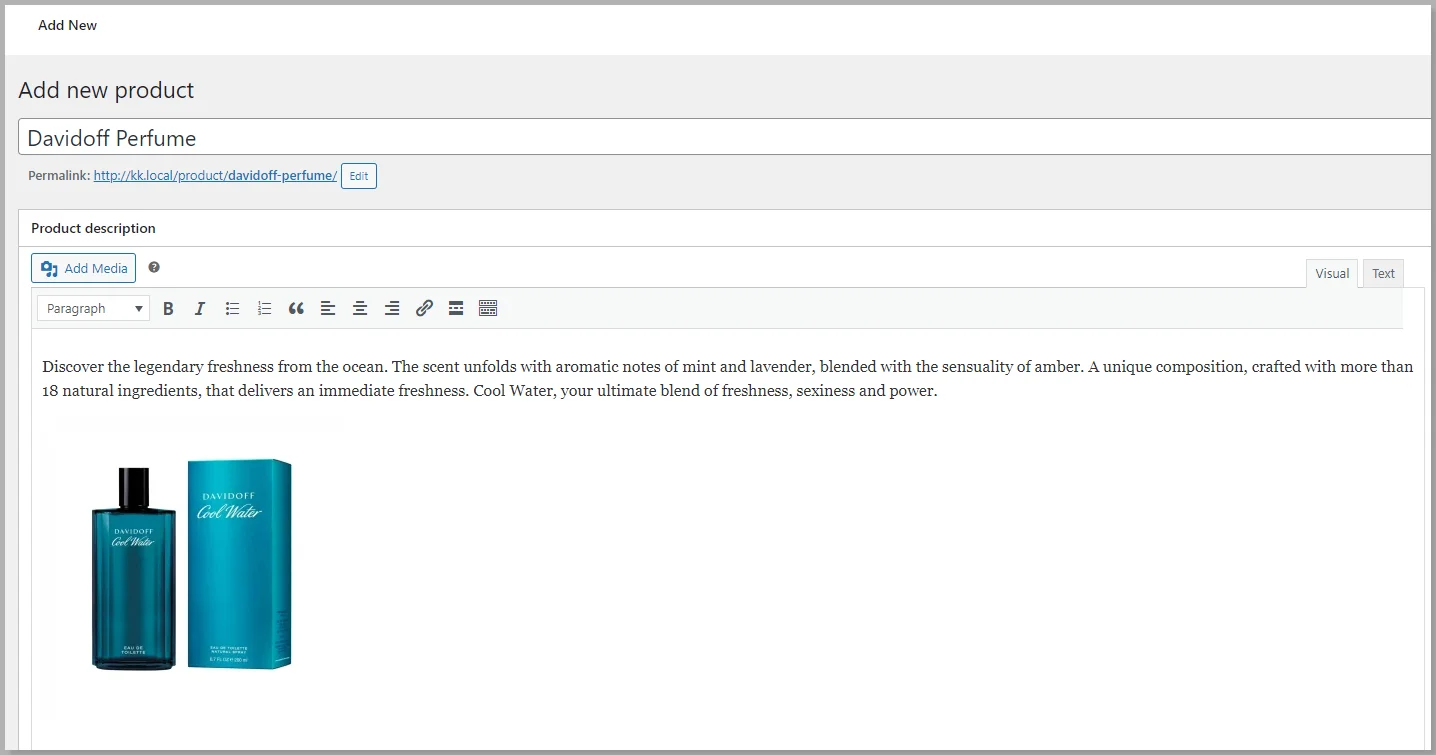
To add a product, go to the WordPress dashboard, hover over the Products menu, and click on the Add New button.
Next, fill in all the details related to your product, like product name, description, price, attributes, and other fields.
Here, I’m taking an example of a perfume brand.
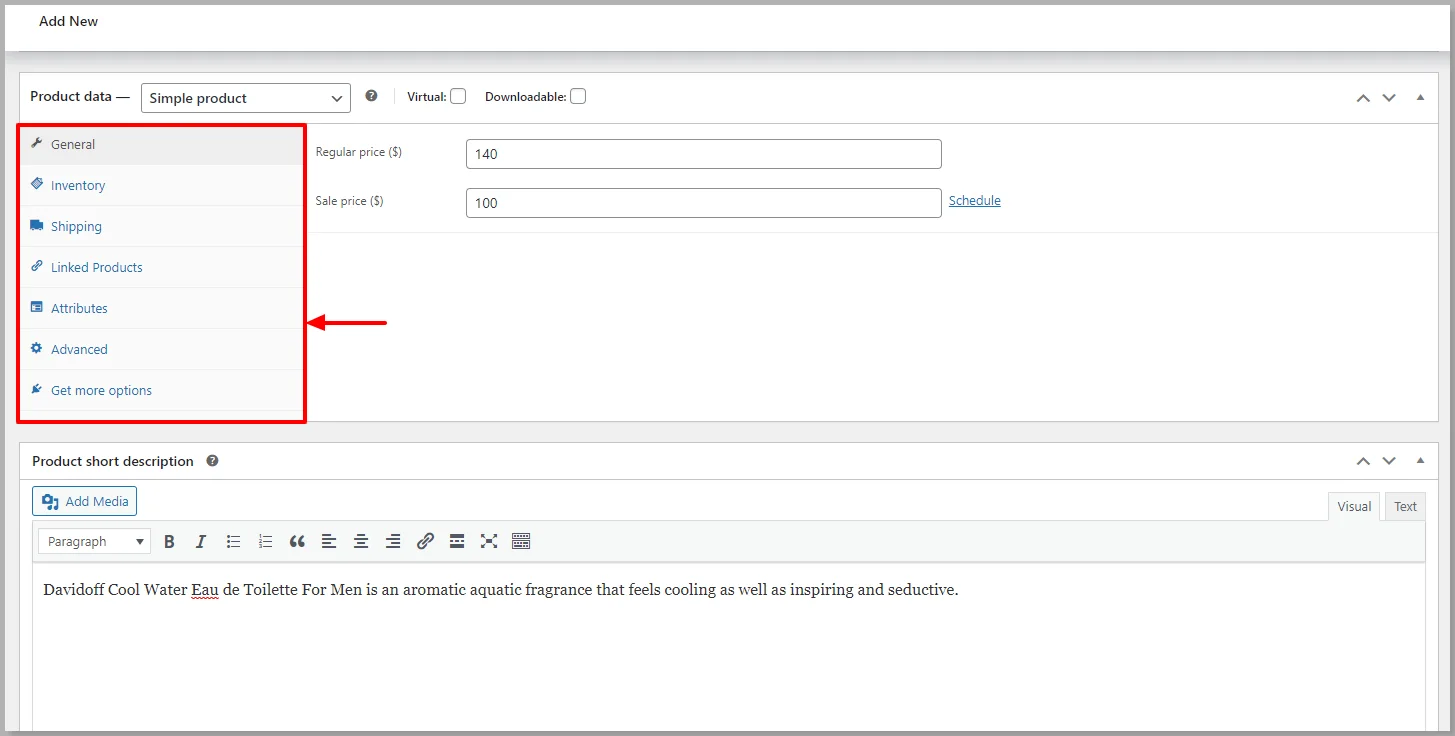
Scroll down to find the Product Data, and make sure to fill in all the details correctly.
You can even add product categories and select the appropriate tags for each product, helping your customers find the products more easily.
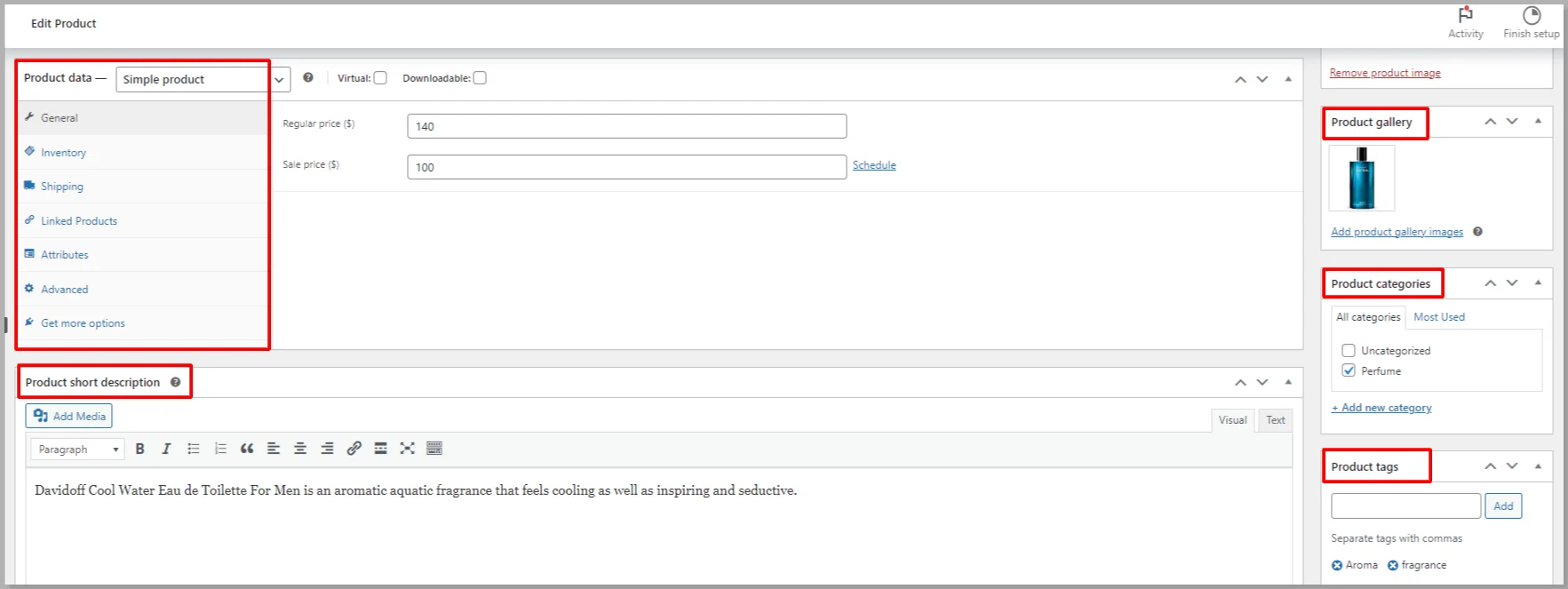
After filling in all the details related to the product, click on the Publish button.
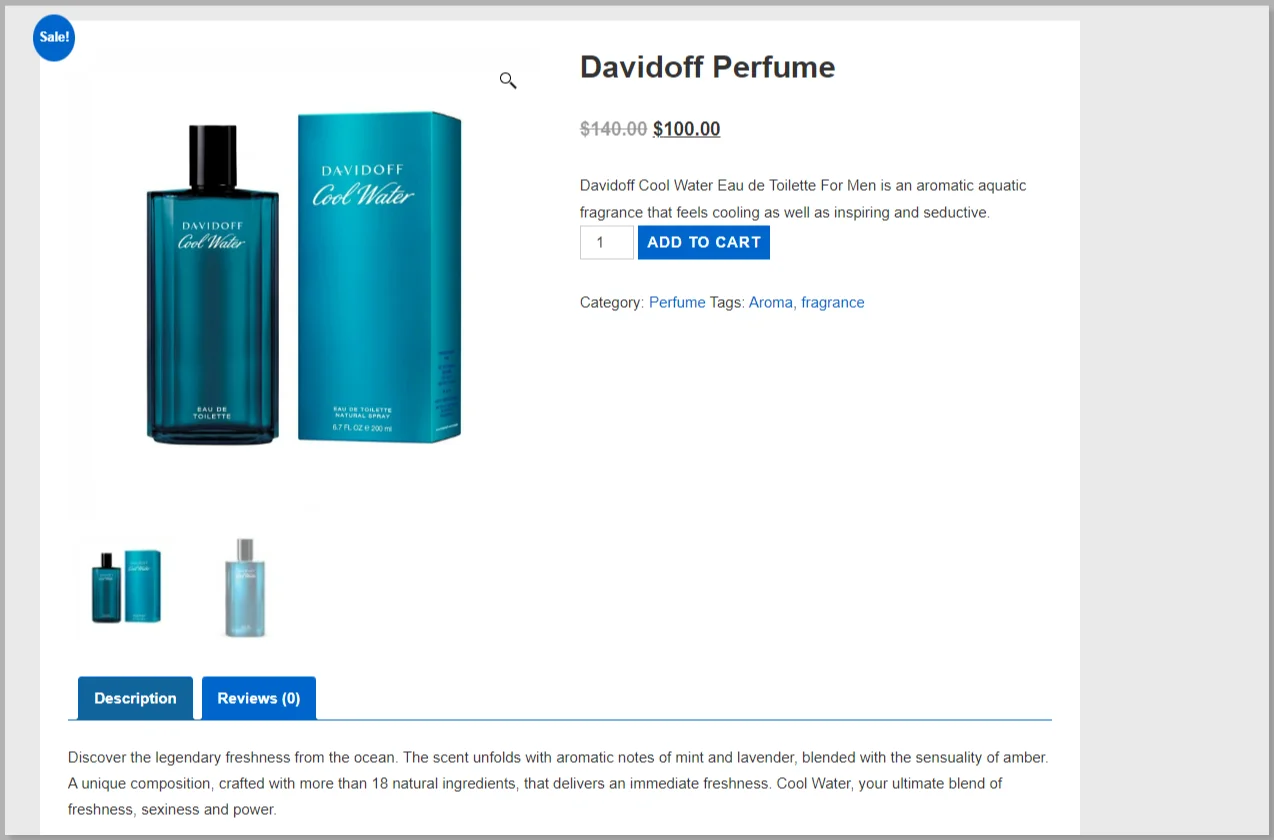
And that’s it; your final product will look like this in your online store.
Why Choose WooCommerce Over Other eCommerce Platforms?
WooCommerce has been trusted by most of the top businesses today, and around 6M users are currently active.
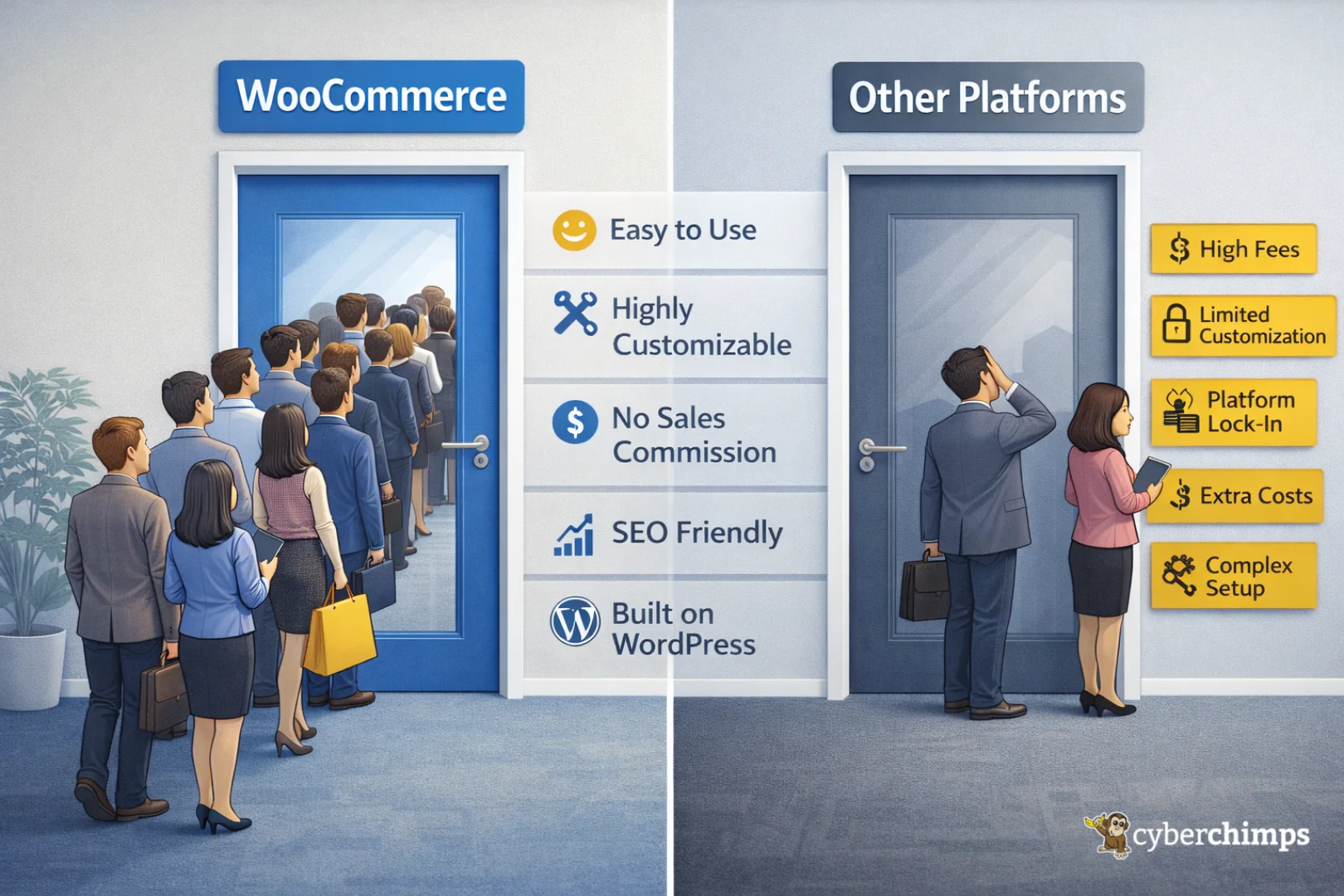
Here are the top reasons why WooCommerce is an ideal platform for building an Ecommerce website:
- Easy to Use: WooCommerce is user-friendly, making it easy for businesses to set up and manage their online store.
- Great Customization Settings: It offers a wide range of customization options, allowing businesses to create a unique online store that fits their brand.
- WooCommerce is Flexible: It’s very easy to sell products using
WooCommerce. You can sell any type of product, virtual, physical, or digital, and any number of products you wish.
- High Security: It is built with security in mind and is regularly updated to ensure that it remains totally secure.
- Mobile Phone Optimized: WooCommerce is optimized for mobile devices, ensuring that your online store is accessible to customers on all devices.
- No Commission on Sale: Unlike platforms like Shopify, WooCommerce doesn’t charge you a commission for every sale you make. Instead, you can keep all the money you’ve earned.
- WooCommerce uses WordPress: WordPress is the best open-source CMS platform, providing many features and flexibility, helping you build an Ecommerce store with multiple options.
- SEO Friendly: It is built with search engine optimization (SEO) in mind, making it easy for businesses to optimize their online store for search engines.
- Good Support: WooCommerce provides excellent support to businesses in resolving any issues that come their way.
- WooCommerce is Cheap: Most of the features are free, making it an affordable option for businesses looking to establish their online presence.
- Integration with Tools: WooCommerce integrates with many popular tools and platforms, including social media platforms, email marketing tools, and much more.
FAQs
It depends on what you want. WooCommerce gives you more control and flexibility, especially if you already use WordPress. Shopify is easier to start with and needs less setup. WooCommerce is better if you want freedom. Shopify is better if you want convenience.
Yes, it can. Many WooCommerce stores run with 50,000 or even more products. You just need good hosting, proper caching, and a well-optimized setup. The platform itself can handle it.
WooCommerce is used by small businesses, startups, and even big brands. Many online stores selling clothing, digital products, subscriptions, and services use WooCommerce because it works well with WordPress.
Yes. Beginners can set up a basic WooCommerce store without much trouble. The dashboard is easy to understand, and there are plenty of guides, themes, and plugins to help you get started.
No, not for basic use. You can create products, manage orders, and accept payments without coding. Coding is only needed if you want custom designs or advanced features.
Conclusion
Now that you’ve got a strong understanding of WooCommerce, its features, and its benefits, it’s time to start your own eCommerce business.
Install the Responsive theme and WooCommerce plugin to your WordPress dashboard and create your eCommerce store with just a few clicks.
The integration of the WooCommerce plugin and WordPress, along with the Responsive theme, makes it the best combination to create a fully functional eCommerce store.
If you’ve enjoyed reading this article, don’t forget to check out our latest articles as well:
- What Is An E-Commerce Website & How To Build One
- Best WooCommerce WordPress Themes
- WooCommerce vs Shopify vs Magento: A Detailed Comparison
Are you thrilled enough to start building your own Ecommerce store? Then grab the WooCommerce plugin and Responsive theme now!





