
Is your WordPress site painfully slow? Slow load times drive visitors away and tank your SEO. The fastest way to fix this is with a WordPress CDN.
By delivering your site’s files from servers closest to your visitors, a CDN slashes load times and boosts performance.
But not all CDNs are equal. Choosing the best CDN for WordPress and implementing it correctly can transform your site’s speed. Even better, hosting your site with WordPress hosting with CDN built in saves time, reduces hassle, and guarantees top-notch speed.
In this post, we will explore how a CDN impacts your WordPress site speed, why a poor CDN setup can slow you down, and why using WordPress hosting with CDN built-in offers a better experience than adding a separate CDN later.
- How CDN for WordPress Impacts the Site’s Speed?
- How to Get the Best CDN for WordPress
- How to Use and Implement CDN in WordPress
- Conclusion: Don’t Let Slow Speeds Hold Your WordPress Back
How CDN for WordPress Impacts the Site’s Speed?
Building a WordPress site is easy, but keeping it functional is no less than building a castle. When it comes to slow websites, most of us blame heavy plugins or themes. A WordPress CDN plays a vital role in how fast your website loads for visitors around the world.
Imagine you have a WordPress blog hosted on a server in Los Angeles. Your site has beautiful, high-resolution images and custom styles that make it stand out. Now, picture a visitor trying to access your site from Tokyo, Japan.
Without a WordPress CDN, every time a visitor loads your site, their browser requests all the images, CSS files, and scripts directly from your Los Angeles server. This means data has to travel roughly 5,500 miles across undersea cables. The result? Longer loading times and a frustrating user experience.
Now, let’s add a CDN for WordPress to the mix.
If you host your blog with managed WordPress hosting offering built-in CDN, copies of your images, stylesheets, and scripts are stored on servers around the world, including one in Tokyo.
When your visitor opens your site, the CDN automatically serves those static files from the Tokyo server instead of Los Angeles. The data has a much shorter trip, so the page loads faster.
This means your visitor gets near-instant access to your site’s content. The site feels snappy and responsive, keeping visitors engaged and improving your SEO.
Basically, the CDN for WordPress is crucial to cut down the physical distance data travels and reduce the load on your main server, resulting in a much faster, more reliable WordPress experience.
So, if your WordPress site is not backed by a CDN, fixing slow sites will become your everyday task.
Now, many of you must be thinking that I have a WordPress CDN in place, but my site is still slow. Well, having a CDN and having the best CDN for WordPress are two different things.
Not all CDNs deliver the speed boost you expect. In fact, a poorly chosen or misconfigured CDN can make your WordPress site slower instead of faster.
- For example, some CDNs have limited Points of Presence (PoPs). If your visitors are far from these few locations, they still experience long wait times. Imagine using a CDN for WordPress sites with servers only in North America, but most of your audience is in Asia or Europe. The files still have to travel a long way, negating the benefits of a CDN.
- Another common issue is inefficient caching. Some CDNs only cache static files like images and scripts, but do not cache dynamic content or full pages. This means your origin server still handles most requests, causing higher load and slower response times.
- Slow cache purging is also a problem. If your CDN for WordPress takes hours to clear outdated content, visitors might see old versions or get delayed updates, harming user experience.
- Finally, a lack of support for modern web protocols like HTTP/3 or Brotli compression can limit speed gains. These technologies help browsers load content faster, and without them, your CDN underperforms.
Choosing the right CDN WordPress solution is critical. You need a CDN with wide global coverage, smart caching strategies, fast purges, and support for the latest web standards to truly speed up your WordPress site.
How to Get the Best CDN for WordPress
If you want to speed up your WordPress site with a CDN, there are three main ways to do it. Each method has its pros and cons, so understanding them will help you choose the best option for your needs.
1. Using a Third-Party CDN Service
You can sign up with popular CDN providers like Cloudflare, BunnyCDN, or StackPath. After setting up an account, you usually need to change your DNS settings or configure your domain to route traffic through their network.
This method gives you access to powerful CDN features and a large global network. However, it requires some technical knowledge to set up correctly, and you’ll have to manage your CDN and hosting separately.
2. Choosing WordPress Hosting with CDN Built-In
Many managed WordPress hosting providers now include a built-in CDN as part of their service. This means your CDN is already configured and optimized for WordPress when you launch your site.
You don’t have to deal with extra plugins, complex settings, or separate accounts. Hosting with CDN included offers seamless integration, faster setup, and fewer chances of conflicts. It also simplifies billing and support since you deal with one provider.
Let’s take the example of InstaWP’s managed WordPress hosting here. It comes with a built-in CDN and advanced edge caching functionalities. This means you get all the benefits of a WordPress CDN without the complex setup or extra plugins.
The CDN you get with InstaWP is not any run-of-the-mill option. Its CDN for WordPress is backed with features like:
1. Global CDN Network
InstaWP’s CDN uses multiple Points of Presence (PoPs) around the world to deliver your site’s images, scripts, and stylesheets from servers closest to your visitors. This cuts down load times no matter where your audience is located.
2. Edge Caching Beyond Static Files
Unlike many CDNs that only cache images and static content, InstaWP’s edge caching also works for dynamic WordPress pages. This reduces the load on your origin server and delivers pages much faster.
3. Pay-As-You-Go Pricing
InstaWP’s flexible managed hosting plans mean you only pay for what you use. Have a small site that requires fewer PHP workers and limited CDN storage, get its Starter Plan. Have a large eCommerce site for tons of digital assets to manage? Go for the Turbo Plan that comes with 128 GB of CDN storage.
4. Optimized for WordPress
InstaWP’s hosting environment is fine-tuned to work seamlessly with WordPress themes, plugins, and workflows. The built-in CDN and caching are designed specifically to boost WordPress site speed and reliability.
With managed hosting and built-in CDN, you get a faster, more secure, and easier-to-manage WordPress site. No complicated setups or extra plugins. Just lightning-fast performance right out of the box.
3. Using a CDN Plugin for WordPress
There are plugins like CDN Enabler or WP Rocket that help connect your site to a CDN. These plugins simplify the process of rewriting URLs to point to your CDN’s servers. While plugins can be helpful, they still require you to have a CDN service running somewhere.
Plus, relying on multiple plugins can sometimes lead to conflicts or extra maintenance.
Now, you must be wondering which is the best way to get a WordPress CDN?
While all three methods can get the job done, WordPress hosting with CDN built in is usually the best choice for most users.
Here’s why:
1. Simplified Setup
With built-in CDN hosting, you don’t have to deal with complex configurations or multiple dashboards. The CDN is already optimized and seamlessly integrated with your WordPress environment, so enabling it usually takes just one click. This removes common mistakes that happen when configuring standalone CDNs.
2. Optimized Edge Caching
CDNs built into WordPress hosting are fine-tuned for how WordPress delivers content. They cache not just static assets like images and CSS but also intelligently handle dynamic pages, WooCommerce content, and API responses. This means faster load times without compromising functionality.
3. Reduced Plugin Conflicts
Adding a separate CDN often involves installing extra WordPress plugins that can conflict with existing caching or security plugins. Hosting with CDN integrated reduces plugin clutter, lowers the risk of compatibility issues, and simplifies site management.
4. Unified Support and Billing
With integrated hosting and CDN, you get one point of contact for support and one simple bill. This makes troubleshooting easier and saves time coordinating between your hosting and CDN providers.
5. Better Security and Performance Synergy
Hosting providers that offer CDN integration often include additional website security features like Web Application Firewalls (WAF) and DDoS protection that work hand-in-hand with the CDN. This layered approach boosts both site speed and safety.
In short, choosing WordPress hosting with CDN built in eliminates the guesswork and technical overhead of separate CDN services, ensuring your WordPress site runs fast and smoothly from day one.
How to Use and Implement CDN in WordPress
Enabling a CDN on your WordPress site might sound technical, but with InstaWP, it’s surprisingly simple. Here’s how you can get started and make the most of a WordPress CDN with minimal effort:
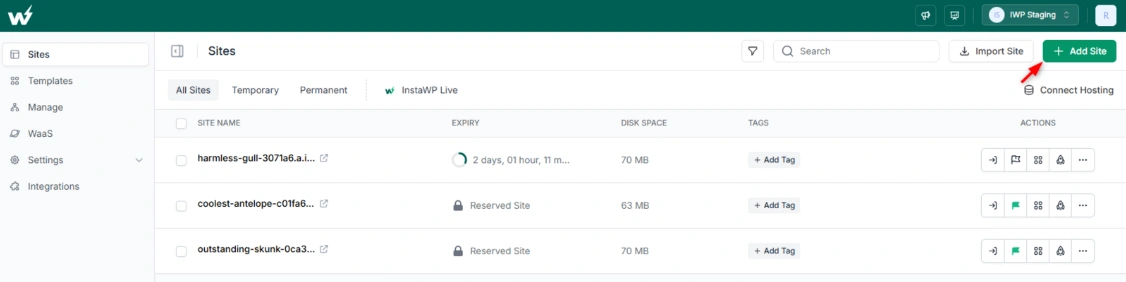
Create or Connect Your WordPress Site on InstaWP
Start by creating a new WordPress site or connecting your existing site within the InstaWP dashboard. InstaWP’s platform lets you spin up fully functional WordPress environments in seconds.
Choose the Correct Site Plan
To make sure you enjoy the best CDN for your WordPress site, choosing the right InstaWP site plan is key. Each plan includes different CDN capabilities along with storage, backups, and management features designed to fit your needs and budget. Here’s a quick overview:
- Starter Plan ($5/month): Best for tiny sites, this plan includes basic 10 GB CDN with 10 PoPs.
- Plus Plan ($9/month): Ideal for small dynamic sites, Plus offers 30 GB premium CDN with 119 PoPs.
- Pro Plan ($15/month): Medium-sized sites benefit from 75 GB CDN with 119 PoPs.
- Turbo Plan ($25/month): Perfect for eCommerce and resource-intensive sites, Turbo gives you 125 GB of premium WordPress CDN
- Elite Plan ($45/month): For sites with higher traffic, Elite provides 200 GB premium WordPress CDN
Choosing the right plan ensures your WordPress site gets fast, reliable content delivery through InstaWP’s integrated CDN network, with the right balance of bandwidth and features for your project.
Enjoy The Best CDN for WordPress
Once the plans are selected, click on ‘ Create Site’ and your site will be created in no time.
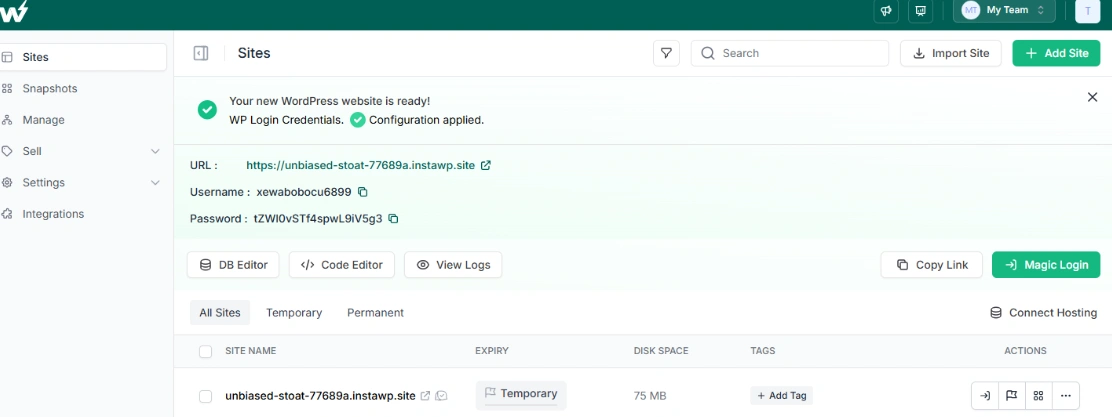
Because the CDN for WordPress is integrated at the hosting level, you don’t need to install any additional WordPress plugins to make it work. This keeps your site lightweight and
Test Your Site’s Speed and CDN Status
After enabling the WordPress CDN, use tools like Google PageSpeed Insights or WebPageTest to confirm faster load times. You can also check response headers in your browser’s developer tools to verify that content is being served from the CDN.
Conclusion: Don’t Let Slow Speeds Hold Your WordPress Back
A slow WordPress site frustrates visitors and hurts your growth. Using a reliable WordPress CDN is one of the smartest ways to boost your site speed, improve user experience, and climb search rankings. But not all CDNs perform equally; a poor CDN can do more harm than good.
That’s why hosting your site with WordPress hosting with CDN built in is often the best choice. It simplifies setup, eliminates plugin conflicts, and ensures your CDN is fully optimized for WordPress performance.
InstaWP’s managed WordPress hosting offers a powerful, built-in CDN with global edge caching, advanced security features, and flexible plans that scale with your needs. Whether you are a freelancer, agency, or business owner, InstaWP helps you deliver lightning-fast WordPress sites without the technical headaches.
Ready to leave slow loading times behind? With InstaWP, enabling a world-class CDN is just a click away.
FAQs:
The best CDN for WordPress offers global coverage, edge caching for both static and dynamic content, and seamless integration with your hosting. InstaWP’s built-in CDN checks all these boxes with easy setup and top-tier performance.
Yes, you can add a third-party CDN or use plugins to connect your site to a CDN. However, for hassle-free speed and management, choosing hosting with a built-in CDN like InstaWP is often better.
You can implement a CDN by signing up with a CDN provider, configuring DNS settings, or using plugins. With InstaWP, it’s simpler—you just enable the CDN toggle in your dashboard, no extra setup needed.
Hosting with CDN built-in offers easier setup, better optimization for WordPress, fewer plugin conflicts, and unified support, making it the superior option for most users.
Yes, InstaWP’s CDN and edge caching are designed to be compatible with all standard WordPress themes and plugins, ensuring smooth performance without extra configuration.





