
Summary
The article explains the complete WordPress security guide. It defines essential security practices to protect a WordPress site from hacks and threats.
It also highlights key tips like strong passwords, updates, backups, firewalls, and security plugins. Helping readers secure their WordPress site and prevent common vulnerabilities.
Apart from the advantages and perks that WordPress has to offer, its security has become the talk of the town these days. Not that it imposes any threat to your data or files but allows you to take external measures to uptight the security of your website.
By taking security seriously, it means not eliminating the risk entirely but reducing it to a certain extent. The best thing is that even if you are not a tech-savvy, there are still a lot of things you can do to keep your site protected.
Considering how Google is blacklisting several websites each week because of phishing and malware, if you own one, its security should be a priority for you. Although the core of WordPress is quite secure and is even audited periodically by several developers, there are certain practices that will further help you make the security tough.
Why is WordPress Security Important?
A hacked website can cause serious damages not just to your business revenue but your brand’s reputation as well. Right from stealing sensitive data to installing malicious software, there is a lot that these advanced hackers are capable of.
In a worst-case scenario, some website owners even have to pay ransom to these intruders just to regain access. Having said that, here are some reasons so as to why WordPress security is an important thing.
Customers’ Data Can Be Compromised:

These days, hackers use malicious software to infect websites and accumulate data. And, in some of the worst situations, they even hijack the resources of the computer. If your site gets attacked and the access is compromised, a trespasser can easily redirect your traffic to another destination and can infect your users’ browsers with malicious software.
Although there are thousands of malware and innumerable ways to infect websites, however, the only common thing among all is the objective. All of these hazardous things are used to retarget your customers and steal their sensitive data, including email Ids and card details, if available.
Loss of Business Reputation:
Currently, there are billions of websites available on the internet. And, mainly, people depend upon search engines to find what they are looking for. Hence, search engine optimization turns out to be quite an important technique to gain more organic customers.
If your website is under threat or isn’t safe enough for a transaction, search engines warn customers and even restrict them from exploring your website altogether. Lately, Google has sharpened its game by marking websites as insecure if they don’t have an SSL (HTTPS) certificate.
Not just that, but several sites were penalized as well the moment this rule went live in July 2018. If this happens to you, it will become even problematic to reach out to new customers.
Regaining Access Can Be Costly:
As a website owner who has just discovered that the site has got hacked, your first instinct would be to find relevant and effective help on the internet, isn’t it? Although you’ll come across a myriad of articles and blogs, however, in the end, every recommendation will readdress you towards a professional.
Executing a WordPress malware removal is surely not an easy task. That’s the reason why a service like this can cost a bomb to you. And then, even after paying a huge amount, you can never be sure if your site has got the clean chit and is now thoroughly safe or not.
Accordingly, almost 84% of the sites carry vulnerabilities, which make them prone to hackers’ attacks. The entire process of clean-up includes discovering these vulnerabilities and strengthening the core of the website to prevent it from intruders, which is obviously going to be expensive.
Website Can Be Blacklisted:

In a nutshell, Google isolates thousands of suspicious websites every day in the name of blacklisting. When you visit a website and if it displays “This site may harm your computer” in the search result, know that it is blacklisted.
While consumers are grateful for such warnings, businesses are panicking over it. If your website gets under this list, it won’t take much time before you lost 95% of your organic traffic, which will end up impacting your revenue directly.
Generally, a website gets blacklisted if it comprises harmful things, such as malware. Only after cleaning your website you can expect to get relisted on the search engine, which may take several months before you’re back in the game.
Types of Attacks
With each passing day, new attacks are appearing on the internet, causing significant problems for communities, businesses, and individuals. So, here are the most common types of attacks that may infect your website.
SQL Injections (SQLi):

Injection vulnerabilities have been recognized as the major concern that is impacting several websites every day. These tech-geeks and advanced hackers are using certain Structured Query Language (SQL) string commands to get inside the websites.
Such strings can easily be integrated into login forms, search boxes, and URLs. If hackers are successful in getting what they intend, gathering usernames, passwords, credit card details, email IDs and other information from your website wouldn’t be a tough task with SQLi.
Not just that, but your entire system gets attacked in such a way that the access is compromised and makes your worst nightmare come true.
Malware:

If you’ve ever clicked on a malicious attachment or a link, know that you’ve had a close call with this kind of security threatening attack, in short – Malware. This is one of the most common attacks to get a foothold on your website.
Malware denotes several kinds of hazardous software, including ransomware and viruses. Once malware makes its way inside your site, it can wreak havoc. Right from controlling the entire system to spreading confidential data across, there is a lot it can do.
It can even upload harmful attachments or files to your websites to gain more clicks and reach to the computers of your visitors.
Broken Authentication:

As obvious as it is, your WordPress website requires you to type in the combination of username and password to gain the access. However, the fact that you may don’t know is that there are several flaws that come along with this kind of authentication system.
It can actually exploit your website in many ways, such as automated brute force, dictionary attacks, session hijacking, credential stuffing, and more. If the attacker is successful in guessing the correct username and password, impersonating the real owner will become easier for him.
In this way, he can conduct several suspicious actions on your website without leaving any signs behind.
Eavesdropping Attack:

This one is another dangerous attack that can bring the confidential data on your site under threat. It occurs through the intervention in the network traffic. With eavesdropping, an attacker can gather passwords, credit card details, and other sensitive information that your customers would be sending over your network.
This attack can be passive or active. While the former allows a hacker to detect the information after listening to the transmitted message, the latter one makes it easier to grab information by concealing the real identity, which is known as tampering, probing, or scanning.
Out of both these kinds, passive attacks are dangerous as they don’t involve friendly units to execute eavesdropping.
Cross-Site Scripting (XSS):
XSS is one such attack that is often misunderstood and underestimated. Here, the website front performs as the launching point for attacks on users visiting your website. The primary reason behind this attack is the negligence that developers took while testing their codes.
If the scripts are vulnerable enough to get injected, they can be then used for several reasons, without the help of original functions of the website. If an XSS susceptibility is present on your site, an attacker can curate such a code that can be executed whenever somebody opens your site.
This will result in the direct interaction of the new user with the malicious background object crafted by the hacker.
Precautionary Measures to Prevent Hacking
If all of these attacks mentioned above were scary enough, now is the time to get some relief. Keeping your WordPress website secured surely won’t be that taxing if you are wary of precise techniques and practices.
So, here are the best precautionary measures that you can take to prevent intruders from getting a hold of your website.
Keeping WordPress Updated:
One of the most effective ways to ensure that your site remains safe and protected is to keep it updated. WordPress is a massive platform, handled by several developers across the world. They are always on their toes to detect threats and remove them then and there.
Thus, this platform notifies users whenever there is an update. Using an old version, not just lets you miss upon the opportunity of trying new features but can even keep you away from experiencing the smoothness of a version devoid of threat. Hence, keep your WordPress site up to date all the time.
Toughen Up Your Access Control:
The admin panel of your website has everything you wouldn’t want hackers to detect or see. Using easy usernames and passwords simply delineates you putting down the guards for intruders to come inside the website and mess things up.
Hence, make sure that you are enforcing such a username and password that is hard to decode. You must even put a limit to the number of login attempts within a specific time. Also, keep changing your password from time-to-time to be on the safe side.
Install Security Socket Layer:
Basically, HTTPS is a Hypertext Transfer Protocol System that is meant to secure the communication between networks. By displaying HTTPS in front of your URL, you reassure your users that no intruder or hacker is taping upon the content they are sharing with your website.
Furthermore, for such sites who store passwords, credit cards, and more information, Google has even made it compulsory to use HTTPS protection. So, if you haven’t used it yet, it’s time to do so.
Website Security Plugins:

Once you’re sure that you’ve done every possible thing in your power to protect the website, switch to automatic tools for further protection. WordPress offers a lot of plugins that are meant to keep your security game higher.
Right from firewall protection to plugins meant to take data backup or notify you of suspicious activity, there are many to explore and experiment with.
3 Tips For Keeping Your WordPress Login Details Secure
1. Use strong passwords
The number one most popular attack with WordPress websites is the Brute Force Attack. This form of attack involves hackers using powerful algorithms to try thousands of password combinations until they find the right one. Brute Force attacks are likely to succeed if your password is a dictionary name or is commonly used.
The best way to protect your WordPress login details from a Brute Force Attack are:
- Using complex password: A complex password should be between 8 and 28 characters long and should include uppercase letters, lowercase letters, special characters, and numbers. It should also be changed at least every 180 days.
- Reusing the same password: Single password should not be re-used for different sites. Repeating the same password for multiple platforms means that all your platforms are in danger if a hacker accesses the password.
- Limiting the number of log in: As previously mentioned, Brute Force attacks are based on trial and error and therefore won’t succeed if the algorithms used can’t continue trying to log in after a specified number of failed attempts.
By default, WordPress allows users to attempt different passwords as many times as possible. However, you can add a plugin that allows you to set the maximum login attempts at a click of a button. Such a plugin also defines how long the user will have to wait to try again after a failed attempt
2. Use Password Managers
If you have multiple WordPress platforms that require logins, you may be finding it hard to remember all of them. Remember that you should not use the same password for multiple sites, and your passwords should be long and complex. While writing them down in a notebook is an option, it is tedious not the safest way either. We recommend the use of password managers.
A password manager is a tool that stores all your passwords and allows you to manage them using one master password. Even better, this tool also helps you generate strong passwords when creating new accounts and store them in the cloud.
Password managers come with a password autofill feature meaning that you do not have to enter them manually. Also, the majority of password managers come with a mobile app to enable users to access their accounts using their smartphones safely.
3. Use a VPN
Another important way to protect your WordPress login details is by use of a VPN. This tool helps you stay anonymous while surfing the internet. Cybersecurity experts warn that there is a high likelihood of hackers stealing your login credentials when you sign in an account using public Wi-Fi.
The traffic between your device and public WI-FI router is usually unencrypted making it easy for anyone with packet sniffing software to intercept and steal login credentials. Also, there is a high likelihood of hackers creating fake rogue public Wi-Fi hotspots to trick you into connecting to their data harvesting schemes.
Public Wi-Fi hotspots can also be manipulated to launch a man-in-the-middle attack whereby the attacker redirects your traffic to a fake server designed to capture your login details.
A VPN encrypts your traffic on any network meaning that third parties cannot identify its source. This tool is a must have if you are regularly using public Wi-Fi to access your WordPress account. If you are looking for an affordable and yet high-quality VPN, we recommend that you choose NordVPN provider. This VPN provider is among the most popular in the industry.
How to Enhance Your WordPress Security?
After realizing how important it is to keep up with the security of your website you must take action now. Here we have listed down easy methods to enhance your WordPress security. Hence, you can check all of these below and see which one or maybe more of these you have not done yet and do it ASAP.
Update Your WordPress Software
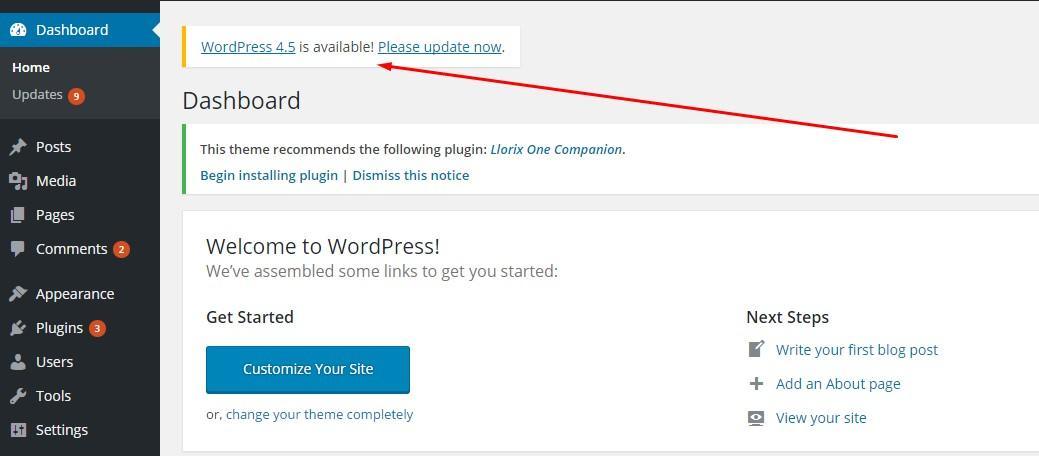
The very basic thing you need to keep in mind related to WordPress security is to update your software frequently. As WordPress is an open source software, it is updated and maintained on a regular basis. The small updates are installed by the software automatically. However, for a major update release, you need to manually start the updating process. Similarly, you should regularly check for all your installed plugin updates. It usually pops in the WordPress dashboard news section.
To check the updates,
- Go to your site
- Open your WordPress Dashboard
- Click on updates from the side panel
- Here you will see any new update release which you can install by clicking the button underneath it.
Passwords and Permissions Management
The most common type of WordPress hacking is password theft. Hence, the best way to avoid is to keep a strong, complex password for all of your WordPress logins. Which includes; WordPress admin area, your professional email address, FTP accounts, database, and WordPress hosting account. The biggest mistake WordPress beginners make is to set a simple password because it is easy to remember. Forget that and use password managers to not only create strong and complex passwords. It also saves it for you so you don’t have to remember it.
Get a WordPress Backup
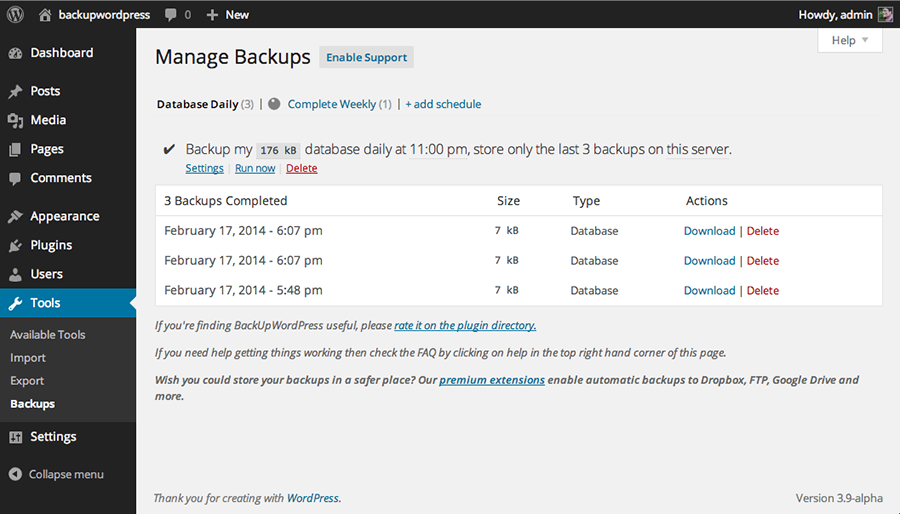
Furthermore, Backup means saving your site’s data on some other source to avoid complete loss when attacked. WordPress backup is the best contingency plan against any hacking attempt. Remember you can not avoid hacking, even major tech-giants can’t. So, keeping a backup keeps you on a safer side.
To backup your WordPress site’s data,
- Simply search on Google for best WordPress backup plugins
- Read reviews and select your plugin by clicking on it website link
- Go to the site and download the file
- You can use some free versions however premium ones are better
Install a WordPress Security Plugin
A security plugin is a system which monitors and tracks all the activities going on your website. Which includes; malware scanning, file integrity monitoring, failed login attempts, spam comments etc. Luckily there is an official WordPress security plugin, Sucuri Scanner. It is available for free. Here how you can install and use it.
Role of Web Application Firewall (WAF)
A web application firewall (WAF) for WordPress is a special barrier. It blocks all malicious traffic before it even makes its way to your website. WordPress recommends its official WAFs which you can review and install.
Username Management
Thankfully WordPress now allows you to change the username from ”admin” to anything custom, at the time of WordPress installation. Unlike the earlier days where ‘admin’ was used for half of the login credentials. It was easier for hackers to launch a brute-force attack. However, still, some of the easy WordPress installers keep the default username ‘admin’. If you are one of those, it’s recommended to switch your WordPress hosting. Since WordPress doesn’t allow to change the default username. You can keep a custom login username by the following ways;
- Delete the default admin username and create a new one.
- You can get username plugin for WordPress which sets it up for you.
- Or change the username from phpMyAdmin.
Keep in mind that the above methods are to be used for changing the username ‘admin’. The administrative role will still be assigned only to one user.
WordPress Login Page Management
To avoid any DDoS attacks by hackers, you must password protect your WP admin and login page. This would stop them from launching a random password and login attempts from login and server panel of your WordPress. Learn how to do it here.
Furthermore, WordPress let you make as many login attempts as you want by default. This makes your site vulnerable for hackers to launch a brute-force attack by trying many failed login attempts while guessing the username and password of your site.
However, you can limit the number of failed login attempts by anyone. Additionally, if you use any firewall as I mentioned above. Then it will manage this by default. Here’s how to do it;
- First, install the Login Lockdown plugin and activate it as per directions.
- After that go to the settings and set the number of tries you want from ”Login attempt limit” section and save changes.
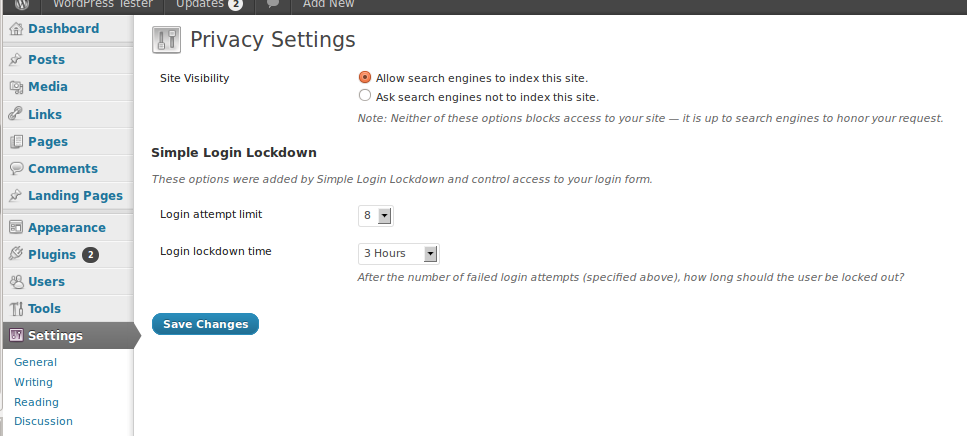
Moreover, you can also add a two-factor authentication 2FA to your WordPress login screen. This will make it harder for any hacker to break into your site. You can do it by keeping a secret question, a secret code, a set of characters along with your password. Which will be required for login. Additionally, I personally prefer the popular Google Authenticator app, which sends a secret code to your phone. The login now is secure with a code which will only be delivered to your personal mobile number.
Auto-logout the Inactive Users
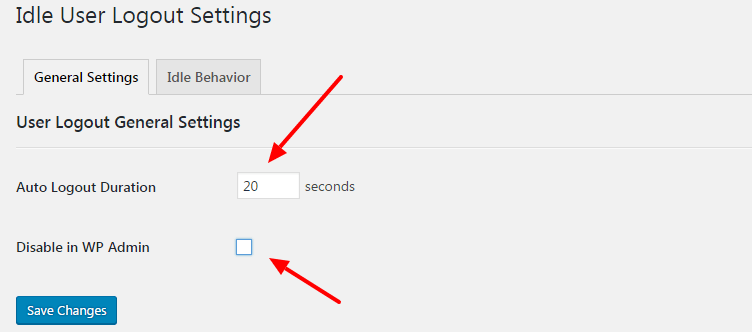
It is possible that the logged user may be away from the desk. This possesses a potential threat of hacking. Anyone can hijack their session and change the credentials. Hence, it is important to automatically log out inactive users. Here’s how to do it;
- Get the Inactive logout plugin, install it and activate it as per instructions.
- After that go to its ‘‘Settings” then click ”Idle User Logout Settings”
- Now set the duration in ”Auto logout duration” box and check the ”Disable in WP admin” box and save changes.
FAQ
It aims to protect the integrity of your web application, safeguard your data, and provide thorough reporting of any potential intrusions.
Regularly updating provides increased security by patching known vulnerabilities to prevent threats and attacks.
Use a strong username and password combination and restrict login attempts. This approach prevents unauthorized access.
Common attacks include malware, SQL injections, cross-site scripting, and Brute Force Login. All of these attacks can compromise the security of your site.
Security plugins can add additional layers of security by providing a firewall, scanning for malware, and giving you real-time monitoring of your website.
Conclusion
WordPress security is one such sensitive subject that can cause such problems that might seem out of control. So, whether you are starting a new website or using the existing one, make sure you are paying undivided attention upon the security to gain more advantages and better output.
If you found this helpful, then consider reading these articles:
- WordPress vs Other Popular WordPress Alternatives
- Top Drag & Drop WordPress Page Builders
- How to Change Logo in WordPress
Use this guide to safeguard your data and WordPress website today!





